


OS X Daily: “Send AirPlay Video from an iPhone or iPad to a Mac, PC, or TV with XBMC” plus 2 more |  |

- Send AirPlay Video from an iPhone or iPad to a Mac, PC, or TV with XBMC
- 13 Beautiful High Resolution Retina Wallpapers for the New iPad
- Mac Setups: MacBook Air 11″ & Mac Mini Web Development Workstation
| Send AirPlay Video from an iPhone or iPad to a Mac, PC, or TV with XBMC Posted: 25 Mar 2012 09:04 AM PDT
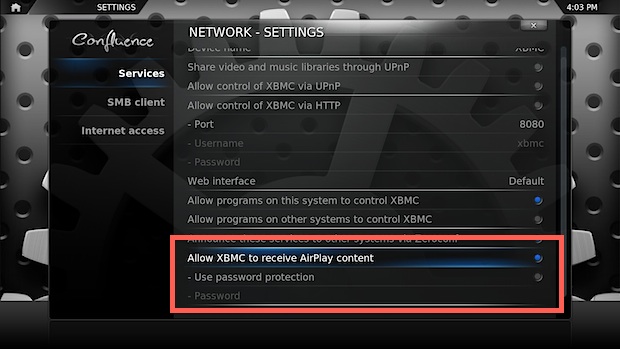
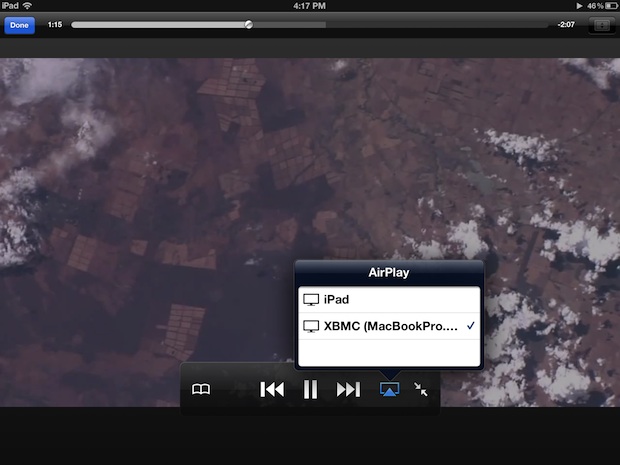
XBMC is a powerful free app that turns any Mac or PC into a full fledged media center. The newest version has been updated with a slew of improvements, but most interesting for iPhone and iPad users is the addition of AirPlay video support. This means you’ll be able to wirelessly transmit video from an iOS device to anything running XBMC, whether it’s a Mac hooked up to a TV or an old PC, here is how to set that up and get AirPlay video working. Enable & Set Up AirPlay Server in XBMC on a Mac or PCThis will be the same for Mac OS X, Linux, or Windows:
Export AirPlay Video to XBMC from an iPhone or iPadNow from the iOS device:
Unfortunately XBMC will only accept non-DRM video to be shown with AirPlay, meaning some trailers within Trailers app and a fair amount of content downloaded from iTunes won’t show up at all. You’ll know instantly if it’s working or not because the video either works or it doesn’t within XBMC. Even if you don’t have an interest in the media center and AirPlay side of things, XBMC is worth having around for its ability to play a wide variety of movie formats that would otherwise require codecs, including MKV, divx, and others.
|
| 13 Beautiful High Resolution Retina Wallpapers for the New iPad Posted: 24 Mar 2012 01:41 PM PDT
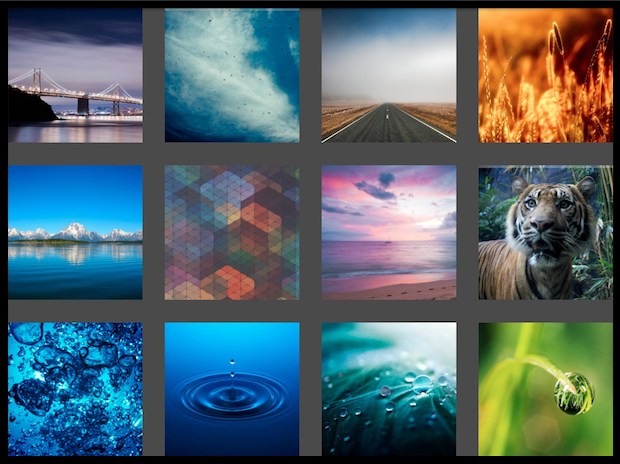
Looking for some gorgeous high resolution images for your new iPad? Here are a handful of gorgeous retina wallpapers, each measuring 2048×2048 pixels. Click on any of the images below for a full sized version, though some of the links go to InterfaceLift and the iPad 2048×2048 version must be selected manually from their drop-down download menu, labeled as “new iPad (3rd gen)”. Enjoy!
Thanks to @RetinaiPadWalls on Twitter for a handful of these, they tweet nothing but high-res iPad wallpapers and are worth a follow. While you’re there, don’t forget that you can follow us on Twitter too. Check out our wallpaper archives too, though many are geared towards traditional resolutions.
|
| Mac Setups: MacBook Air 11″ & Mac Mini Web Development Workstation Posted: 24 Mar 2012 01:21 PM PDT
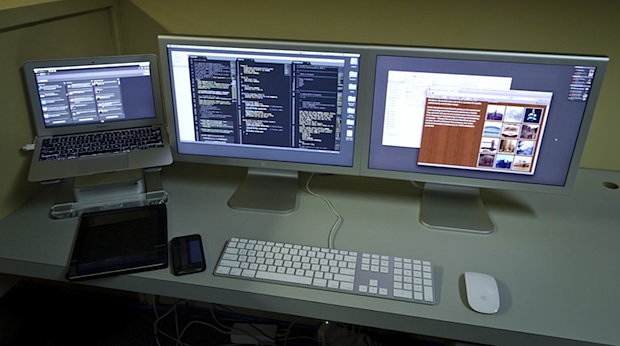
This weeks great Mac setup comes to us from Eddie B who uses his Apple gear for web design and development. The MacBook Air serves as the primary work machine and the Mac Mini, resting below it, functions as a web server. Here’s the full hardware list:
I’m a big fan of the Apple Cinema Displays, both old and new models have classic designs, even the later model 20″ displays shown don’t look aged whatsoever. It’s also pretty amazing that an ultra-portable Mac like the 11″ Air is powerful enough to function as a primary workstation, they really do provide the best of both worlds to users looking for portability and power. For those in the market for a laptop stand, the Griffin Elevator laptop stand Want your Mac setup featured? Send in pictures of Apple & Mac setups to osxdailycom@gmail.com and include some brief hardware details and what you use it for.
|














 )
) shown in the shot is hard to beat. I have the same stand for a MacBook Pro and it’s highly recommended for those who use an external monitor with a Mac laptop, it raises a laptop to eye level while providing for huge amounts of airflow underneath.
| You are subscribed to email updates from OS X Daily To stop receiving these emails, you may unsubscribe now. | Email delivery powered by Google |
| Google Inc., 20 West Kinzie, Chicago IL USA 60610 | |
0 comments:
Post a Comment