Click " Skip Ads " to view this page

Saferich.biz
Watch TVKim.com Search Komando.com 1,000 + Free Downloads Shop Kim's Store More Free Cool Sites
Kim Komando
Kim KomandoSign-up for Kim's Club Now

April 19, 2012

Keep your child off drugs

There are many rumors swirling around the origins of this drug user's holiday, from the police code for smoking cannabis to the number of active chemicals in marijuana (incorrectly given as 420 for both).

One thing's for sure: Drug use isn't a joke, especially not when it comes to your kids.

NotMYkid is a website full of resources for concerned parents. To mark 4/20, it is taking a stand against juvenile drug use by handing out free drug test kits in 9 cities on the 19th.

Additionally, notMYkid is providing a free drug prevention planning guide for the whole family. It can help you ask the right questions to connect with your kids on this serious issue.

CLICK HERE to visit today's cool site now >>

Screen shot of: http://www.komando.com/coolsites/index.aspx?id=12386

The text: Find it fast links. Daily Freebies @ komando.com with a curved arrow pointing to komando.com
Bullet in the form of a curved arrowApp of the Day

POW! Turn your photos into old-timey comic strips with this amazing app.
CLICK HERE TO FIND OUT MORE >>

Bullet in the form of a curved arrowNews of the Day

Keep up to date on all things digital with the Daily News at Komando.com. You'll find easy, fast video news releases, too!
CLICK HERE TO FIND OUT MORE >>

Bullet in the form of a curved arrowFREE Download of the Day

Are you thinking about leaving Instagram? Don't leave all your photos behind! Save them with this download.
CLICK HERE TO FIND OUT MORE >>

Bullet in the form of a curved arrowTip of the Day

Learning a language for foreign travel isn't easy, but it is a good idea. Here are some online resources that will help you speak like a pro.
CLICK HERE TO FIND OUT MORE >>

Bullet in the form of a curved arrowDigital Minute of the Day

(Kim's Club members only--join now!)
Best Buy has picked up the nickname "Amazon's showroom." Tune in to find out what that means and why it isn't a good sign for brick-and-mortar retailers.
CLICK HERE TO FIND OUT MORE >>

Bullet in the form of a curved arrowVideo of the Day

If you saw somebody on the side of the road with a flat tire, would you stop to help? Would it make a difference if it was a beautiful woman? These people find out for themselves in this cool video.
CLICK HERE TO FIND OUT MORE >>

advertisement

Improve the Sound of your mobile device!

advertisement

Kim's Spring iPad Giveaway! Enter Now!


advertisement

Enjoy your music more with these great products - and save 20 percent!

Windows 8 new features

Play

WINDOWS 8 NEW FEATURES

Windows 8 is on the way. Watch Kim show you what's new and improved. It's unlike any other version of Windows!

500 people in 100 seconds

Play

KIM'S VIDEO FAVORITES: 500 PEOPLE IN 100 SECONDS

You've seen stop-motion photography before, but not like this. The filmmaker takes pictures of 500 people holding other pictures. Run together, it creates a unique effect of a film within a film.

USB handheld zoom magnifier

Buy

USB HANDHELD ZOOM MAGNIFIER

USB zoom magnifier makes it easy to read papers, recipes, and other documents using your computer screen.

Sponsored Links

Get 2 FREE months of Carbonite

I trust my photos, files, and memories to Carbonite Online Backup. You should too. Hard drives die. You need a backup. Sign up now for your free 15-day trial. No credit card required. Get 2 months free if you decide to buy.

carbonite.com/kim

Half off VIPRE Antivirus!

VIPRE Antivirus is ranked No. 1 for Windows 7. Detects and blocks all types of malware, including viruses, spyware, Trojans, adware, worms and rootkits. VIPRE is easy to use and won't slow down your PC. Free tech support!
Go to

TRYVIPRE.COM/KIM

One call can lower your mortgage today

Keep money in your pocket. Take advantage of today's low interest rates. Call Quicken Loans at 1-800-QUICKEN. Or use their online tools. Equal housing lender.

quickenloans.com/home-loans

Access Your Mac or PC from Anywhere

The world's best remote access software now gives you access to all your files and applications on your computer from your iPad! Try GoToMyPC FREE for 45 days!

gotomypc.com/s/kim

Try me for a month!

Watch my show live or on-demand! Listen on your schedule. Have your questions answered on my message board and more. All for less than $5 per month. I know you'll love it.

komando.com/kimsclub

Not a Member of Kim's Club yet?
Join Kim's Club today!

Follow me on the web
FacebookTwitterYoutube

Advertise | Advertiser Comments | Sign Up for our Email Alerts | Privacy Policy | Terms and Conditions

To unsubscribe or modify your subscription, use our online form.

Copyright © 2012 Weststar Digital Audio, Inc. All Rights Reserved.

Please add kimcoolsitereply@lyris.komando.com to your address book ensure Kim's emails reach your inbox.

To view this email as a Web page, go here.

OS X Daily: “OS X Mountain Lion Developer Preview 3 Available for Dev Download” plus 4 more

Link to OS X Daily

OS X Mountain Lion Developer Preview 3 Available for Dev Download

Posted: 18 Apr 2012 12:59 PM PDT

OS X Mountain Lion Developer Preview 3

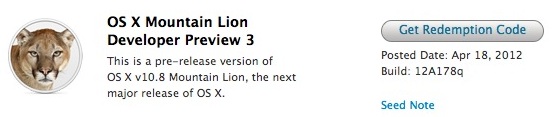
Apple has released OS X Mountain Lion Developer Preview 3 to those registered with the Mac Developer program. The new build comes as 12A178q and includes many bug fixes, though it still includes a fairly lengthy list of known issues and bugs. This is the third beta release of OS X Mountain Lion, which currently has a rough public release date of “Summer” .

Developers can download OS X Mountain Lion DP3 from the App Store, though logging in through the developer center is necessary in order to receive a redemption code.

Due to stability issues and future upgrade problems, Mountain Lion Developer Preview should not be the primary operating system on a Mac. Follow a guide to set up a dual boot system between OS X 10.8 Beta and the more stable OS X 10.7 build for best results.


39 Free Online Classes from Coursera Offer a World Class University Education to Anyone

Posted: 18 Apr 2012 10:05 AM PDT

Coursera free online classes from great universities

Like to learn new things, preferably from world class experts? Then you’ll like Coursera, a new organization from which several prominent universities aim to offer free high quality online courses to anyone, anywhere.

Princeton, Stanford, U Michigan, Penn, and UC Berkeley are among the schools currently participating in the program, and combined they offer a wide variety of classes on various topics. Whether you’re interested in Humanities, Social Sciences, Healthcare, Medicine, Biology, Math, Statistics, Economics, Finance, Business, Society, Networks, Information, or Computer Science, all classes are completely free and taught online.

The free Computer Science courses may be of particular interest to our readers, and those classes include: Algorithms I and Algorithms II, Automata, Compilers, Computer Architecture, Computer Science 101, Computer Vision: 3D Reconstruction to Visual Recognition, Computer Vision: Fundamentals, Cryptography, Design and Analysis of Algorithms I, Game Theory, Introduction to Logic, Machine Learning, Natural Language Processing, Networked Life, Probabilistic Graphical Models, Securing Digital Democracy I, and Software Engineering for SaaS.

You can see the full list of free course offerings at Coursera.org

Course length varies from 4 weeks to 12 weeks. A handful of classes start this month, and many more begin in May, June, July, August, September, November, while others are still listed as To Be Announced.

Education is a great thing, and Coursera looks to have a strong future. Hopefully they come out with an iPad app similar to Khan Academy for easier self-paced learning and for those who wish to follow along more casually.

If you like the idea of learning without a gigantic university-sized price tag, iTunes is another great resource for free classes and lessons, with videos and podcasts offering free foreign language lessons, free iOS 5 development classes, general iPhone development courses, and much more.


How to Zoom the Camera on iPhone

Posted: 18 Apr 2012 09:08 AM PDT

Zoom iPhone Camera

Using the camera zoom feature on an iPhone, iPad, or iPod touch running iOS 5+ is slightly different than in previous versions. Here is how to activate and use zoom:

  • Open the Camera app or swipe up to access the lock screen camera
  • Bring up the familiar zoom bar with a pinch gesture
  • Use a outward spread gesture to zoom in, or use a pinch gesture to zoom out

Once the magnification bar is present you can also slide on the bar itself to zoom in and out, the same way it worked in prior versions of iOS.

Remember the iPhone cameras zoom feature is currently limited to digital zoom, this basically means that a standard photo is taken and then automatically cropped around the portion you zoomed into, mimicking a real zoom feature. This is a common practice on all digital cameras and smartphones, but the resulting zoomed in images are grainier than a zoomed out picture would be. That cropping and zooming ability is a task anyone could do themselves manually in iPhoto or another basic image editing app too, and for that reason it’s often better to ignore the digital zooming ability and just take a standard photo to later edit yourself.


New iPhone 4S Commercials Feature Samuel L Jackson and Zooey Deschanel

Posted: 17 Apr 2012 11:11 PM PDT

iPhone 4S Siri commercial with Sam Jackson and Zooey Deschanel

Apple has released two notable iPhone 4S commercials that feature popular celebrities using Siri. The first TV ad shows Samuel L Jackson planning a special evening with his wife thanks to the help of Siri, and the second commercial shows Zooey Deschanel using Siri to manage a lazy rainy day. Both commercials can be viewed embedded below.

Samuel L Jackson “Date Night” iPhone ad:

Zooey Deschanel “Rainy Day” iPhone 4S ad:


Preview a URL Directly in Mail for Mac OS X

Posted: 17 Apr 2012 02:09 PM PDT

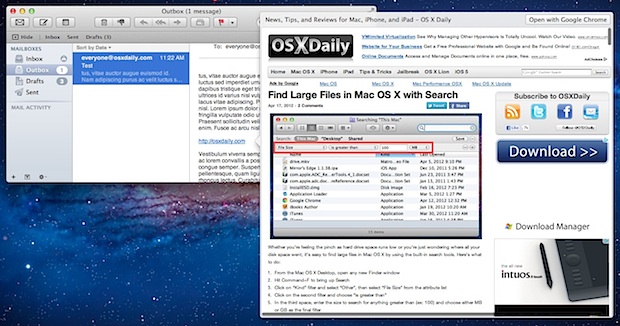
Preview Websites in Mail app for OS X

Everyone gets emails filled with links, but what do you do when an incoming message includes a potentially dubious URL that you aren’t quite so sure about? Rather than crossing your fingers and blindly clicking the link to open in the default web browser, try this tip out:

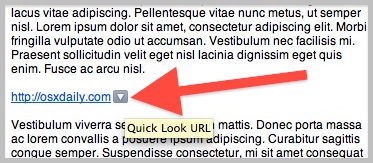
  • Hover over the URL within the mail message until you see the grey box with a triangle in it
  • Click the little grey box to open the URL in Quick Look

Quick Look a URL from Mail app in OS X

The URL in question will render within a self contained Quick Look frame. This allows you to see and scroll through the website in question without actually loading it into a web browser, making it a perfect solution for quickly sorting through groups of link heavy emails or those special emails from your uncle.

Similar Quick Look features exist elsewhere in native OS X apps, even in the Finder and in Spotlight menu results.


top