


OS X Daily: “Burn an ISO Image from the Command Line” plus 3 more |  |

- Burn an ISO Image from the Command Line
- iPad 3 Benchmarks Show 1GB RAM and 1GHz Processor
- Turn the iPhone Camera Into a Macro Lens for Free Using a Water Drop
- Khan Academy App for iPad Helps You Learn Just About Anything
| Burn an ISO Image from the Command Line Posted: 13 Mar 2012 11:12 AM PDT
dd can be advantageous for several reasons. For one, the command line aspect makes it easy to use through a remote SSH connection, but perhaps more useful is dd’s low-level functionality which is generally faster than alternatives and could circumvent some error messages. Because this is a command line tool it should be considered mostly for advanced users, and although this is written with Mac OS X in mind it should work with Linux as well, with the exception of the diskutil command. As usual, be certain that all syntax is entered properly to avoid potential problems, and if in doubt, just stick with a simpler method from the GUI. Burn an ISO from the Command Line with ddThe first thing you’ll need to do is find the disk or drive from the command line:
Locate the name of the destination drive in the mounted drives list and make note of its “IDENTIFIER” code, this should be something like “disk1s1″ but it will likely be unique to your machine.
Using the identifier you just found, unmount the disk but do not disconnect it from the Mac:
Enter the administrator password when requested to complete unmount. Burning a disk image using the command line tool ‘dd’ uses the following syntax:
For example, to burn an image located on the desktop of user “Will” called “OSXMountainGorilla.iso” the command would be:
You will notice that dd does not give you updates or a status bar, but when the command is finished running you will be returned to the standard terminal prompt. Any disk image should work as dd is not limited to ISO. You could use this tool to make bootable Mac OS installation drives as well, including for for OS X Mountain Lion and OS X Lion.
|
| iPad 3 Benchmarks Show 1GB RAM and 1GHz Processor Posted: 13 Mar 2012 09:22 AM PDT
Benchmarks were ran by Tinhte.vn, who managed to get their hands on a new third gen iPad a bit early and used the popular benchmarking app GeekBench. The new iPads score of 756 is roughly the same of an iPad 2, though Geekbench does not seem to adequately test the graphics processor on either chip, thus performance of graphics intensive activities like gaming and photo or video manipulation are yet to be determined. The A5X processor is a dual-core CPU that includes quad-core graphics capabilities. The boosted graphics and increase in RAM are necessary to work with the high resolution Retina display included on the new iPad. The third generation iPad is available in stores this Friday, March 16.
|
| Turn the iPhone Camera Into a Macro Lens for Free Using a Water Drop Posted: 12 Mar 2012 03:16 PM PDT
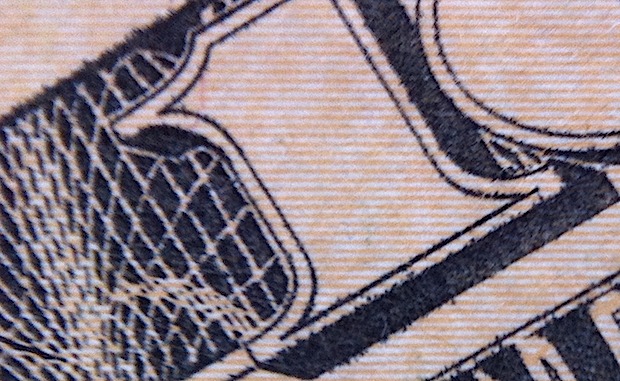
Want a free instant macro lens for your iPhone camera? Carefully apply a tiny drop of water to the lens, flip the iPhone over, and voila, you can suddenly take extreme close ups of just about anything. I know that sounds a little weird, but it works, and the results are fairly impressive. The drop of water has to be tiny and fit pretty much perfectly on the camera lens, aim for a droplet between 1/4 and 1/2 a centimeter wide, just enough to fit on the lens but not go over its border. You’ll want the droplet to be as circular as possible too, otherwise you’ll end up with strange edge effects. I managed with a finger tip but it’s generally easiest to use the end of a pen or pencil to apply such a tiny water drop. Here are a few sample images of extreme closeups of a $10 bill and another iPhone screen, taken with a good old iPhone 4 and a water droplet on the lens: As you can see in the dollar bill images, the quality is good enough to see fibers in the paper and detailed ink lines.
You can also make out places where ink bled, something that would otherwise be invisible to the naked eye.
Using the water droplet macro lens to take a picture of another iPhones screen was equally impressive, clearly showing pixel level details.
I got the idea from Scientific American, who calls it a “microscope”, which may be a bit of a stretch, though they did take some pretty interesting pictures of a few bugs and plants. Give it a try yourself, just be very careful with water on the iPhone, you don’t want to accidentally trigger the water sensors or damage the phone.
|
| Khan Academy App for iPad Helps You Learn Just About Anything Posted: 12 Mar 2012 11:39 AM PDT
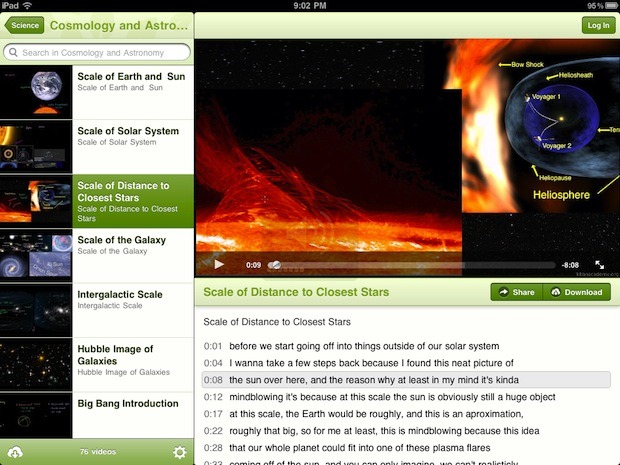
If you like free online learning tools, you’ll enjoy Khan Academy’s new iPad app. Khan Academy is a popular educational service that aims to offer a free world-class education to anyone by way of over 3,000 video courses. These videos and lectures cover everything from biology, chemistry, physics, humanities, world history, finance, programming, computer science fundamentals, K-12 mathematics, and much more. All Khan Academy videos are hosted on YouTube, so why have a dedicated app? The apps primary benefit is each video becomes downloadable, allowing for offline viewing. Considering how easy it is for online distractions to interfere with learning, that’s a significant plus. Other perks to using the app are subtitles, a progress log, and soon the app will include exercises too. Other than the ugly pea-green interface elements (please, just make them gray), the app is quite nice and well worth the free download. Khan Academy app is currently for iPad only, but if you like free education, don’t miss the official iTunes U app either, it works with iPad and iPhone and offers tons of coursework as well.
|
 The most straight forward way to
 The iPad 3 has been benchmarked to reveal



| You are subscribed to email updates from OS X Daily To stop receiving these emails, you may unsubscribe now. | Email delivery powered by Google |
| Google Inc., 20 West Kinzie, Chicago IL USA 60610 | |
0 comments:
Post a Comment