| Dear Friends, Welcome to Issue #528 of InfoAve Free Edition! Thank you very much for subscribing to our free InfoAve Newsletter. If you need to change your subscription or you wish to unsubscribe from our newsletter and break our hearts, click "Manage my subscription" at the very bottom of this newsletter. Thank you for very much for your support.
Cloudeight Direct Computer Care Last week, EB was away. When she came back (two days late!) she was surprised to see how many of 3-Key Computer Repair Packs we sold. Well she's the jealous type and she thinks she can do better than I. We'll see. This week - after threatening to eliminate the 3-Key Computer Repair Packs for the last three weeks - EB has decided to see if she can outdo the sales we had last week when she was gone. So if you want EB to win buy a 3-Key Computer Repair Pack. If EB wins - I win too :-) I can't lose. Starting Tuesday March 13, 2012 we will be offering only single repair keys at $44.95 and a new 2-Key Computer Repair Pack (pricing to be determined after we get done arguing about the price!) We both have decided that this week is it. EB wants to outdo my sales last week - and I have to give her a chance, right? So she's decided to extend this offer through Monday March 12, 2012. If you don't take advantage of this offer this weekend - we both promise you - you won't see this offer again. Sure! Sure! You're saying - but it's true. Don't be sorry - be happy. Buy your keys now and save. This is it - EB says so. After this weekend our 3-Key Repair Pack will be history! Our Cloudeight Direct Computer Care service introductory period is ending soon. We are going to be changing some of our pricing and we'll be discontinuing our special 3-Repair Keys for $99.95 offer soon. Our other pricing will be changing too based on the service required. We wanted to let you all know that we'll be offering our current pricing until March 12, 2012. If you order by March 12, 2012 -- either online or by mail order, you'll be getting a great deal. Our service keys never expire, so you can get them now and keep them until you need them. And we all know that sooner or later our computers are going to start having problems. So now's the time to save a lot of money on any computer services you may need -- from diagnosing and fixing Windows problems - to setting up a wireless network for you - to safeguarding by creating an image-based backup (the only kind that really works when you really need it to work) - to cleaning up your computer and optimizing it -- and more. We can do almost anything you need done and we guarantee our work - you're either satisfied or we'll refund your money. Compare our Prices and Experience! We'd like to show you how our current prices compare to a leading computer repair service. And remember - Geek Squad "technicians" get two-weeks of training, but we've been helping people with their computers for over 12 years.  *Our computer tune up is a full tune up - we do much more than Geek Squad does - when we tune up your computer. We offer many more computer services too! If you have a problem with your computer - we can fix it! . Get more information and lock-in our current pricing by getting your Cloudeight Direct Computer Care service keys right now. The three-pack is a great deal - it works out to less than $34 per repair session. You can't beat our service or our prices -- anywhere. Customer Comments about our Cloudeight Direct Computer Care service A comment from Dorothy
Hello to all my Cloudeight fellow newsletter friends;
For the past few months, (longer, much longer with some files) I have had nothing but grief, heart burn and anything else that describes computer problems and angst. So, I purchased a session with Darcy (EB). What an extensive amount of work she did! At the end of the session, which was more than 2 hours, we both thought that my computer was running smoothly. Not so, according to my computer, as it surprised me with more grief upon re-opening on the next use.
So- I bought another session with Darcy. My OE figured it was time to give this old woman more trouble as if the last bout wasn't enough! OE would not allow me to delete, nope, not one thing! Well, my 'angel' in disguise of Darcy jumped in and saved my day. She also did many more tweaks to get my old (11 years - don't want to give up on XP) computer. At some point, I couldn't download any pictures off either of my 2 digital cameras. Darcy fixed that too. There were so many other things that was bothering me, which I had learned to live with, Darcy fixed. She spotted them upon examination of various files she had been viewing due to problems I had mentioned. She fixed those too. I strongly urge anyone and everyone who is experiencing computer problems to get in on the special pricing of 3 keys for your future use. Very, very cheap at half the price. The wonderful thing about the new service Darcy and TC have offered to us subscribers is that there is no unhooking of wires, cables and such and then loading the tower into your car and delivering it to wherever your favourite computer hospital is and leaving it there for however long. You just sit in your comfortable computer chair, chat away with Darcy as she does her magic and then all is well! Go for it, you will never be sorry. This I can promise you. Many, many thanks to Darcy. Tonight, I will sleep without nightmares.
All the best, Dorothy A comment from Virginia
I just finished a computer cleanup using the new computer care you provide. TC was a real pleasure to work with and I can't believe the difference already. He showed me a faster web browser and cleaned a ton of junk off my computer. It now boots faster and doesn't seem to be constantly trying to run something. I recommend this service to anyone who is considering taking their computer to someone to fix. This was done in my home in a little over 2 hours and I was informed every step of the way what was going on. How much better than leaving it in a shop for who knows how long or having someone come to your home and add or remove programs without you knowing what is going on. Thanks TC. You're awesome! A comment from Eddie
Just wanted to drop a line to tell everyone how pleased I am with the "Cloudeight Direct Computer Care" and their very knowledgeable tech TC. I had been putting up with a slow computer for years, yes, years I'm ashamed to admit. I just got used to waiting and waiting for things to load. It was like Karma, I happened to see an ad for Cloudeight and when I saw the price I couldn't resist seeing if they could do anything to speed it up. My RAM was so low TC couldn't run any additional programs to fix it. We had to put it in "Safe Mode" to free up some RAM (I say "we" because TC guided me through how to do it). It was amazing to me to just sit here and watch all the steps he was taking to free up RAM. And that is all I did, sit here. TC did all the work. And work he did! We started the session at 0830 AM as promised in the email I received. The session ended at 1240 PM after my restoring my computer to 2 GB of RAM! Amazing to me. I kept waiting to hear "Well that's all I can do on my end, you'll have to take it somewhere" or "you'll have to buy more RAM". I didn't hear anything like that. TC worked until the job was complete. What a great bargain too. I'm taking advantage of the sale price and buying 3 more service keys today for future use. I highly recommend their service. Thanks again TC!
QUESTIONS AND ANSWERS Stephanie wants to know why we're not so keen on Avast anymore
I haven't see you say many good things about Avast anymore. Last week I noticed you took it off your recommended programs list. I've been using Avast since you first recommended it and for the most part I've been happy with it. Why did you change your mind? I look forward to your newsletters every week. Thanks for everything. Stephanie
Our answer
The jury (our jury) is still out on Avast. Their new version has ballooned to a monstrous 73MB download. When we first started recommending Avast it was a 7 MB download. Somewhere along the way it put on some weight - but we don't see that it's ten times better than it was. Avast seems to be bent on become the next Norton. We don't understand that. And we're really disappointed in its venturing into the "WOT-like" reputation-based safe-surfing business.
Allowing non-experts to voice their opinions is one thing if it's for entertainment or general reviews. But reputation-based file or site ratings have no place in a serious security product. If Avast wants to include reputation-based ratings in their product (like Norton and McAfee already do) then we're not going to take Avast seriously. There is no room for non-expert opinion when it comes to security software. Since they seem not to be taking themselves seriously with all the bloat and reputation-based ratings, we've stopped taking them seriously as well.
Microsoft Security Essentials (less than a 10MB download) is our current #1 choice for free antivirus. Independent lab test results show MSE holds its own or bests most other antivirus products. Plus with MSE you don't have to put up the upsell nag screens or the silly reputation-based ratings, MSE protects well, has a simple easy-to-use interface, it's easy on resources, and runs quietly in the background doing what it's supposed to do - protecting your computer. Will Avast protect your computer? Yes. Will Microsoft Security Essentials protect your computer as well or better? Absolutely. And with a lot less aggravation too.
Richard doesn't get Windows 7 Libraries
Hi you two. I've been using Windows 7 for 3 months -- and I wish I could go back to my old Windows XP machine, but it finally died. I am having a hard time getting around in Windows 7. One of the things I don't understand is Libraries. I've seen some articles on libraries but I don't understand why I'd need them. I'm hoping you guys can shed some light on this for me. Thanks for all you do! Richard.
Our Answer
Thanks, Richard. Libraries make accessing your favorite folder (or folders) faster. Any folder you add to your Libraries becomes what we call a magic folder. Why? Let us explain. Let's say you have a folder called My Favorite Software. And let's say you store all your installation files in that folder. Did you know you can add that folder to your Library without affecting the original folder? What we mean by that is that the original folder "My Favorite Software" stays where it is, but it shows up as a library in your Libraries folder. What makes it magic is that anytime you add a file or delete a file from your original "My Favorite Software" folder, it will automatically be added to or deleted from your new Library called "My Favorite Software". That's why we call it a magic folder. You can also add additional folders to your new Library or you can add as many new Libraries as you like. Then whenever you "Computer" in the start menu, you new Library folder or Library folders show up under the heading Libraries.
Here we'll show you how easy it is to add a Library.
1. Right click "Libraries" and choose "New" "Library".
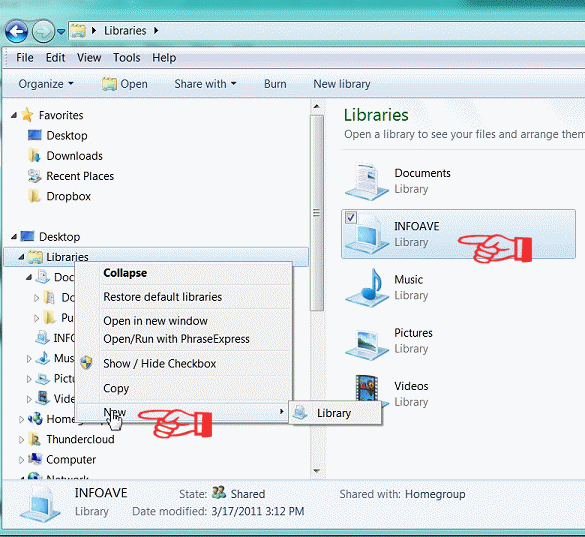 2. Name your new Library. 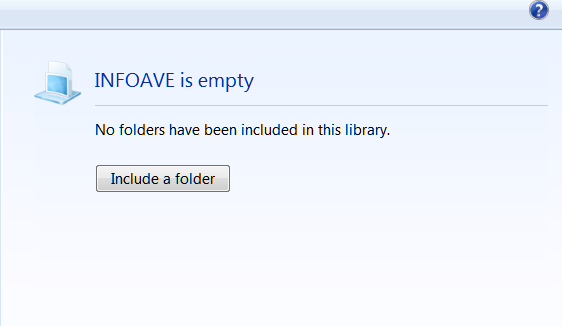 3. After you've named your new Library (we called ours "INFOAVE"), click on the "Include a folder" button (above) and browse to the folder you want to included in your new Library. Keep in mind that nothing is changed in the original folder or moved from your original folder. Your Library folder is a mirror image of the folder you add to it. Anything you add to or delete from your new Library folder is added to or deleted from your original folder. Likewise anything you add to or delete from your original folder is added to or deleted from your new Library folder.
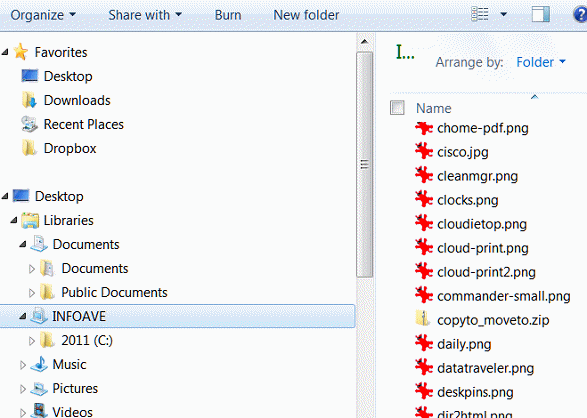
We've added a folder we often used which contains the images you see in this newsletter. As you can see in the screen shot above. Below, you can see how the new library "InfoAve" appears in the Libraries list,
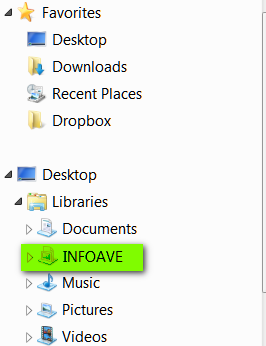
So there you have it - how to create your own Library on Windows 7. It a great way to keep the folders you use most right at your fingertips. It's magic we tells ya!
We hope this helps you, Richard.
InfoAve Premium contains over three times as much content as our free edition - help yourself and help us too... Upgrade to InfoAve Premium right now - LIFETIME SUBSCRIPTIONS are now ON SALE!
Special Offers On Computer Related Products SuperAntiSpyware Professional with a lifetime license - $24.95 - best price anywhere! Registry Commander - Take command of the Windows registry and save $10.00 off the retail price! Captain Optimizer -- Be the captain of your computer - tweak, control, configure, clean and more! Save $10.00 off the retail price! HubbaDogs! We have 'em. Cute dog-shape 4-port USB hubs. Get yours while we still have them!
COMPUTER TIPS AND TRICKS
Explore Your System Processes and More With Process Explorer
Windows XP, Vista, Windows 7 and Windows 8
Words on 32 and 64 bit systems Another great program from Sysinternals is Process Explorer. We're featuring this program along with AutoRuns because the two programs together make a formidable combination whether you're looking to speed up your computer, locate a troublesome resource hog, or just learn more about the goings-on inside your computer. Both AutoRuns and Process Explorer are in our tool kit when we put on our Cloudeight Direct Computer Care hats and start helping others with their computers. Here's one example of how Process Explorer enabled TC to isolate and stop a process that was using 1.4GB of ram on one of our Cloudeight Direct Computer Care customer's computers. The gentleman had 2 GB of RAM installed on a Windows XP computer. He had trimmed his startups and maintained his computer well - yet it was still running very slowly. Digging in with Windows Explorer and looking through his processes revealed nothing unusual. TC installed Process Explorer and organized the process from the most resource hungry to the least. Right there at the top was the culprit - Windows Media Player Server service was running amok and using 1.4GB of RAM - leaving him with only 60MB of RAM free. TC stopped the service and prevented it from running automatically then rebooted his computer - and presto! His computer had 1.4GB of free RAM and it ran like new. Without Process Explorer he would have never been able to find the wayward service. Here's what the Sysinternals guys have to say about Process Explorer "Ever wondered which program has a particular file or directory open? Now you can find out. Process Explorer shows you information about which handles and DLLs processes have opened or loaded. The Process Explorer display consists of two sub-windows. The top window always shows a list of the currently active processes, including the names of their owning accounts, whereas the information displayed in the bottom window depends on the mode that Process Explorer is in: if it is in handle mode you'll see the handles that the process selected in the top window has opened; if Process Explorer is in DLL mode you'll see the DLLs and memory-mapped files that the process has loaded. Process Explorer also has a powerful search capability that will quickly show you which processes have particular handles opened or DLLs loaded. The unique capabilities of Process Explorer make it useful for tracking down DLL-version problems or handle leaks, and provide insight into the way Windows and applications work." 
Sysinternals' Process Explorer Like Sysinternals AutoRuns, Process Explorer does not need to be installed. Just download the zip file, extract the files, and click on its executable (exe). If you're running Vista, Windows 7 or Windows 8, right-click the exe file and choose "Run as administrator" - it will save you time later. Process Explorer is a free 1.8MB download.
 Interactive Corp. (IAC) Uses The Bible To Lure Users Into Installing Malware Interactive Corp. (IAC) Uses The Bible To Lure Users Into Installing Malware
All Windows users
Interactive Corp's (IAC) FunWebProducts has consistently denied their bundle of software (FunWebProducts) is spyware or adware. We're not going to argue what it is. What we can tell you is this: products from Interactive's FunWebProducts has caused many users serious computer problems.
We have repaired a lot of computers helping PC users via our Cloudeight Direct Computer Care service. We can tell you from our own experience – FunWebProducts causes many computer problems. Aside from hijacking your searches and your browser's start page, FunWebProducts spawns pop-ups which seemingly appear out of nowhere, and it's hard for computer users to find out exactly where they're coming from.
FunWebProducts makes numerous changes to your computers registry as well as to other files and folders. And if all that wasn't bad enough, when users install this collection of software, they, by default give permission to the software to "check for and download updates" (this happens without the user's specific knowledge or consent). Users aren't aware that these "updates" can mean updates or it can mean that more programs will be added to their computer. The FunWebProducts bundle currently contains more than a dozen applications – and you get them all when you install any one of the FunWebProducts' program.
Webfetti, Zwinky, Smiley Central, Cursor Mania, Popular Screensavers, My Fun Cards among others. But one not mentioned which is the backbone of the FunWebProducts bundle is MyWebSearch (toolbar). And very few people know that the company behind FunWebProducts also owns Ask. com (Ask.com toolbar is installed by many freeware bundles), iWon, Excite, Evite, Bloglines, MyWay, and others.
Regardless what users download, whether it is Zwinky, Cursor Mania, Smiley Central, etc., they get the MyWebSearch Toolbar – and all of the following (this was obtained from the privacy policy for Zwinky , and it's the same policy you will see if you downloaded any of the other programs):
"…Features of the MyWebSearch Toolbar
By downloading the MyWebSearch toolbar, you will be installing a toolbar in your Internet browser (and any supported email functions and instant messenger functions) with the following features:
SEARCH BOX: This is a search box located within the toolbar that will help you search the Internet with search results from Ask.com.
SEARCH ASSISTANT: This provides relevant links and results when you make a search request in your browser address bar or if your browser address (DNS) request is invalid, misspelled or incorrectly formatted.
WEBFETTI:This feature enables you to customize a social networking profile page with layouts, graphics, custom cursors, music and video.
ZWINKY: This feature allows you to create and modify avatar characters, and use them in a social networking environment. If you use Windows XP, the ZWINKY feature will also automatically provide you with an icon that will appear in your Windows XP system tray at the bottom right of your desktop. Use of the Zwinky feature is subject to separate terms of use at http://info.zwinky.com/zwinkyinfo/tos.jhtml .
SMILEY CENTRAL: This allows you to insert smiley face emoticons and other graphics into your web-mail, Outlook, Outlook Express and instant messages.
POPULAR SCREENSAVERS: This provides you with photos and images that can be added to the user's screensaver or PC desktop wallpaper. Also includes the ability to add personal digital photos.
MY FUN CARDS: This provides access to free electronic greeting cards that you can personalize on the Web and send to any email address.
CURSOR MANIA: Free computer mouse cursors that allow the user to change the look of his/her default cursor to something more fun and expressive.
FUN BUDDY ICONS: Free icons that can be added to an instant messenger client.
HISTORY SWATTER: This allows you to delete easily computer cookies, URL history, temporary cache, and other stored browser files.
POP SWATTER: Free tool that swats pop-up ads before they appear. Includes a "Safe List" to allow pop-ups from user-specified web pages.
SMOTOS: This enables you to post, upload, share, download and store images, and allows you to send such images to email addresses of your choice.
MY INFO: This provides one-click access to news, sports, weather, finances, horoscope, movie listings, lottery results and more, which appear in a thin window to the immediate left of your main browser window.
MY MAIL NOTIFIER: This allows you to use animated characters to alert you to new web mail messages.
MY MAIL SIGNATURE: This allows you to create signature designs to place in the footer of outgoing email messages.
MY MAIL STAMP: This allows you to insert digital stamp designs into outgoing emails.
MY MAIL STATIONERY: This provides you with background images, colors and themes to enhance the look of outgoing email messages.
In addition, an Easy Installer will be downloaded to install this software. It does not install any other software and is automatically deleted the first time you turn off your computer after installation of the above-described products.
You will also have access to websites related with the software described above, (the "Websites").
THE TOOLBAR AND ALL ITS FEATURES LISTED ABOVE ARE FREE…"
All those programs download and install with the so-called "Easy Installer".
But there's one product that IAC/FunWebProducts distributes that we were not aware of until yesterday. It's called DailyBibleStudy toolbar. We found out about it after scheduling an appointment with a lady who was constantly being bombarded by popup every time she opened Windows Live Mail and sometimes her browser.
The first thing we did – is what we always do when we help someone with their computer — we looked at their process, RAM, and services. We saw nothing going on in the processes or services — and this lady's computer had plenty of RAM. We did notice that she had DailyBibleStudy running in several process and in her computer's running services. Because we assumed that no one would stoop so low as to use the Bible to install malware on a computer — we never suspected DailyBibleGuide or DailyBibleStudy.
Still we couldn't explain the popups that appeared when she opened Windows Live Mail. We knew there had to be adware or spyware or malware lurking — but we saw nothing unusual going on in her computer's processes or services. We've repaired so many computers by now we can usually tell by looking at processes and services if malware is the problem. But other than DailyBibleStudy and DailyBibleGuide – we saw nothing out of the ordinary. What kind of scumbag company would lure users into installing malware using The Bible? IAC/FunWebProducts – that's who.
We ran Malwarebytes on our customer's computer — and this is a complete copy of the scan log from Malwarebytes only the user's name has been removed (See the rest of this article here. )
A Really Good Way To Infect Your Computer
All Windows users
Do you have a Facebook account? Probably. About 800 million people do. Have you gotten an email with the subject line "Your Facebook seems to be hacked"? It carries with it a zipped file and in the zipped file is a Trojan (at last that's what 21 of 42 antivirus scanners say: See https://www.virustotal.com/file/3fc224785c77746d2e7f6d0ce9cca6968e010001221db1fed745ff2b39d35103/analysis/1331244182/
We noticed that AVG and Trendmicro don't seem to detect this file. All the other major antivirus programs do. So just because your antivirus program doesn't alert you - don't assume the file is safe. And just because your antivirus program alerts you - doesn't mean the file isn't safe. You need to use your common sense. if you're not sure - check the file at www.virustotal.com - just like we did.
If you want to get infected quickly, open attachments from emails like these. We remind you -- again -- the number one way Trojans and Botnets find their way onto personal computers is via indiscriminately opened email attachments. Unless you're expecting an attachment by email and you know for sure who sent it, don't open it. Just because the "From" address appears to be from someone you know and trust doesn't mean they actually sent it. Companies like Microsoft, Adobe, Google, Apple, Facebook and others, do not send files by email. And with all the cloud storage sites that allow you to share files in your online storage folders, and sites like www.mediafire.com which allow you to upload files to the cloud and then allow you to share them via links to those files - there's really no need to be sending files via email attachment anymore anyway.
With 800 million+ users, Facebook is a huge target for miscreants and criminals. I don't have a Facebook account and the email address for our Cloudeight Facebook account isn't the address to which this email was sent. These kinds of emails are simply mass mailings that are sent to whatever addresses the Trojan is gathering from the computers it is already infecting.
Don't be fooled. Just because you have a Facebook account - use your head and remember 800 million others have Facebook accounts too. If you open the attachment in an email like this you'll be risking your personal information, your credit card and bank account numbers, and you may find that your computer has been turn into a mass-mailing spam machine. You don't want that do you?
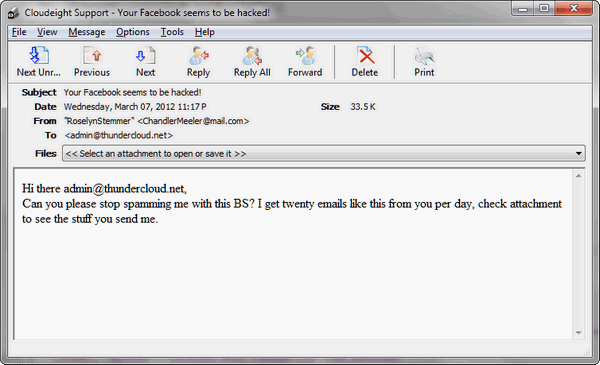
Above: A screen shot of the email that carries the attachment that is infecting thousands of computers right now.

THIS WEEK'S FREEWARE PICK Evernote
A note-taking, snippet-saving, list-making, everything-keeping program almost everyone can use
Works with Windows XP, Vista, Seven, Windows 8 (32bit/64bit)
Also works with iPad, iPhone, and Android smart phones
Synchronizes between your computer and its free cloud storage space – as well as between your computers, smartphones and tablets.
60.24MB download (Dialup users, this won't work for you)
For many years I've written the newsletter in a Notepad-like application called "MetaPad" (which I really like, by-the-way). The newsletter sort of grows through the week as I find things and write about them – and each of these articles is stored in a MetaPad file. Now I know better than to keep an open file on my desktop without saving it periodically – because Windows, not even Windows 7, is completely error-proof. But last week I lost almost three days of work because I didn't follow a simple rule of Windows — ALWAYS SAVE YOUR WORK OFTEN. I got up from the computer, went to get some lunch and came back and Windows had rebooted. Normally, and for the longest time, Windows always played nice and went to sleep when I'd leave for a while.
And normally when I'd come back, a shake of the mouse or the press of a key would wake Windows and I'd go back to work. But when Windows reboots unexpectedly and you haven't saved your work – it's gone with the Windows. I suppose I could have downloaded and some forensic tool to extract everything I've ever typed on my computer – for $500 or so (no, the free ones would not have done what I needed done). But I don't have $500 or so and so I was up until about 3AM re-writing the newsletter from memory. The program that installed the drivers had disturbed the gentle balance of Windows and instead of going to sleep – it died in its sleep. In life that's the best you can hope for, I guess. But we're talking Windows here.
Now, quit your yawning — I'm getting to the point. This week I decided I was never going to go through that again. And you're thinking I decided to save my work more often. You're right and you're wrong. I will do that, but after a few weeks or months I'll get lazy again and won't save work as often as I should. Someday in the future, I'd be up writing at 3:00 AM or worse, pulling an all-nighter. I've done too many of those too – but not since the days of Windows 98/ME.
There's a program I keep hearing about called Evernote. And frankly I had tried it several years ago before the dawning of the age of the cloud. I wasn't impressed. But being the good and wonderful guy I am, I decided everything and everyone deserves a second chance. Look, I've given EB about fifty second-chances but she never acquiesces – but I keep trying to get her to see things my way. In short, I gave Evernote another try – and I'm here to tell you, I'm mucho gladiolas I did.
What a fantastic program Evernote has become. This entire newsletter was written in Evernote. I've got snippets of freeware and tips I want to try for future newsletter stored in Evernote. I've got some notes on Windows 8 ( you'll see those in coming weeks) stored in Evernote. I've got software keys and boilerplate templates – I've even got recipes and reminders stored in Evernote.
I really believe that every single one of you (except those of you still using dialup) could benefit from using this program. Whether you use it to keep track of household expenses, or to write notes to yourself, or to keep recipes or photos or snippets of Web pages, or images or photos… whatever, Evernote makes it easy to do – and you'll never have to worry about your computer going belly up and leaving you in the lurch with nothing. Everything you enter in Evernote is synchronized between your computer and the space in the cloud Evernote provides you. And if you have a smartphone (iPhone or Android) or an iPad you can synchronize your notes and other things in Evernote with all of these.
Evernote is great for collaboration too. If you want to give someone access to your files and notes in Evernote you can give them access. If you're working in a business setting this feature it great. EB has access to Evernote so she can review what I'm writing – and I can leave her nice little messages to assist me with things I need assistance with – which is mostly everything. If you wanted to write a novel with a friend, Evernote is for you. If you don't want to share anything with anyone and you want to keep all your stuff private, Evernote is for you too.
OK you're getting really tired of my droning. How about a little picture to wake you up?

Evernote is super fast and very easy to use. You can store data locally on your computer and synch it to a folder in the cloud so you never have to worry about your computer going down or belly up and losing everything you've saved. Evernote automatically saves notes – there's no reason for you to look for the 'save' button.
Your notes are stored inside Notebooks – how clever. Just create a Notebook for each category or project you want. If you want tag your notes, you can easily do that (tagging makes things easier to find by using keywords).
Evernote creates excellent screenshots. You can use it alone or you can share your work with others. You can even keep certain Notebooks private while sharing others. You can email notes from within Evernote – or you can add things to any Notebook by sending an email to the special email address Evernote gives you when you sign up.
You can access your Evernote Notebooks from anywhere using your laptop, desktop, smartphone, or iPad.
You can use Evernote's todo lists to remind you of things you need to do. You can add "Ink Notes" or "Audio Notes" (if you have a microphone on your computer). You can even export your notes as a Web page (HTML) which makes it great for me because HTML is the format of the newsletter.
I can't list every possible way you could use Evernote. You can use it in so many different ways – ways I've never even thought of.
Evernote's free version gives you 60MB of space each month. That's a lot of space for notes. It's not a lot of space if you're going to store a lot of images – but since its name is Evernote and not Everimage – keep that in mind it more for notes with small images than an image-storage service. If you need more space you can upgrade to Evernote Premium – but really folks, 60MB of space for notes each month is a lot of space. I can store every InfoAve Premium newsletter for a year in Evernote and not even use up one month's allotment – and as you know, InfoAve Premium contains a lot of text Every 28 days, just like the cycle of the moon, your Evernote gives you another 60MB of space. I haven't been using it long enough to know, it's only been three heavenly days – three wonderful days of not having to worry about losing everything I've written to the woes and whims of Microsoft Windows 7.
Enough of this. By now, Evernote sounds like the best thing since fresh peaches to you – or it doesn't sound like anything you'd use (really?). If you want to learn more about Evernote and download it, you can get it from here. http://evernote.com/ . Get it and use it – you'll love it! Do you have a freeware program you love? Tell us about it!
This week's essay Security Does Not Begin With "S"
You might think that security begins with an "S" as in Security Software, but I'm here to tell you that it begins with "Y" as in YOU.
You may have read one of the many articles appearing seemingly daily in the news about some big corporation or another being "hacked" by an individual miscreant or a cabal of criminals. And you're probably in the majority who believe that hackers are sinister, invisible scumbags who live in filthy, musty basements and who crouch over their souped-up laptops hacking into computers to steal money or information in order to live the good-life without working.
And you probably also believe that the brand-name (and expensive) security suites like Norton offer better protection than the humble, free anti-virus programs that are still available (but slowly disappearing). You might think that the price you pay is directly proportionate to the protection you receive.
What You Believe May Hurt You
If you believe any of the above you're wrong. Dead wrong. And being wrong when you're talking about your personal information and your security on the Web it could cost you – your money and your identity. Read the rest of this essay here.
Our Information Avenue Web Site The best of our tips and tricks, freeware picks and more are now online! You can leave your comments, make suggestions, and give us your feedback on our new interactive Information Avenue Web site. As of today there are 282 freeware picks, 759 computer tips and tricks, and a lot more information on our new Information Avenue web site. And we add more tips, tricks, freeware picks, featured articles and more - every day! You'll find our new site-search feature helps you find the information you want - instantly! Give it a try. We think you'll find our new InfoAve site a great place to go if you're looking for past freeware picks, tips and tricks or other computer information. Just type what you're looking for in the site search and if we've got it, you'll find it. It's easy and it's very fast. Please come visit our Information Avenue Web site. We're sure you'll find something you can use every time you visit. We update that page every day. And you can leave your comments after any article.
And you can get new tips, tricks, freeware picks, and more each day via email - subscribe to our FREE InfoAve Daily newsletter. It's free and it's sent every evening around 7:00 P.M. Eastern time (USA).
Wait! Don't reinstall Windows! Read this first! Until now, if you're computer had corrupted or damaged Windows system files, there was only one way to repair the damage: reinstall Windows. But that means if you don't have your files backed up (and you should, you know) - you're going to lose everything, not to mention all the personalization and settings changes you've made. It's a hassle to reinstall Windows; it means hours or days - or even weeks - trying to get your computer back to the way you want it. Try Reimage right now! But now you don't have to resort to reinstalling Windows - you can choose to use Reimage. Reimage keeps an huge inventory of Windows system files to replace or repair any missing or corrupted files on your Windows XP, Windows Vista or Windows 7 computer. And with a money-back guarantee, you've got nothing to lose but the aggravation of installing Windows. If your computer is at the point where you're seriously consider reinstalling Windows - stop. Try Reimage first. We think you'll be glad your did! Get more information and or try Reimage right now. Reimage can replace and repair critical Windows system files and save you from the hassle of reinstalling Windows. Try Reimage right now!
 Visit Our Donation Station
Thanks again for subscribing to Information Avenue Free Edition. Have a nice weekend. Best wishes, Eightball & Thundercloud
Cloudeight Information Avenue Free Edition - Issue #528
March 10, 2012 Questions? Comments? Suggestions? We're always glad to hear from you! If you need to change your subscription address or wish to unsubscribe from this newsletter :( click "Manage my subscription" at the very bottom of this newsletter. 
Share this newsletter with your friends! Forward this newsletter or send a link to this newsletter online at http://thundercloud.net/infoave/archives2012/week-528.htm . We'd appreciate it and maybe your friends would too! . PLEASE CLICK HERE TO READ THIS IMPORTANT DISCLAIMER
This newsletter is published weekly by:
Cloudeight Internet LLC
PO BOX 73
Middleville, Michigan USA 49333-0073 | 





0 comments:
Post a Comment