| Dear Friends, Welcome to Issue #534 of InfoAve Free Edition! Thank you very much for subscribing to our free InfoAve Newsletter. If you need to change your subscription or you wish to unsubscribe from our newsletter and break our hearts, click "Manage my subscription" at the very bottom of this newsletter. Thank you for very much for your support.
 Get our new Cloudeight Direct Computer Care 4GB USB Flash Drive for just $69.95 with FREE shipping to anywhere! Here's a chance to get a Cloudeight Direct Repair Session Key ($44 retail), a registered version of Registry Commander ($39.95 retail) and Cloudeight InfoAve Volume 8 E-book ($11.95 retail) all on 4GB USB flash drive (a $16 retail value) all for just $69.95 - with FREE shipping to anywhere in the world. You can use your Cloudeight Direct Computer Care Repair Session key, any time: it never expires. Plus we'll include on the USB flash drive a one-year license key for the best & safest registry cleaner and optimizer, Registry Commander, you can use to help keep your computer running well and copy of our InfoAve Premium Volume 8 E-book. And the 4GB USB flash drive is ReadyBoost Ready -- so you can use it to increase your system memory (Windows 8, Windows 7, and Windows Vista only) by using the free space on the USB flash drive (over 3.5GB) as RAM. Get your Cloudeight Direct Computer Care USB Flash Drive today - over a $100 value for just $69.95. Please visit this page for details and/or to order yours today.
MID-YEAR Clearance Sale - Get our InfoAve Premium E-Book Volume 8 For Just $5.00 Our Cloudeight InfoAve Volume 8 E-book is now six months old - but the information in it is just as fresh as it was the day we published. Here's your chance to get your copy of our InfoAve Premium Volume 8 E-book for just $5.00 (Downloadable - Immediate Delivery). This e-book contains all the tips, tricks, answers, freeware picks and more - of all 52 issues of InfoAve Premium from October 2010 through September 2011. This E-book contains page after page of reliable and helpful information for all computer users and for those using Windows XP, Windows Vista and Windows 7 - there are tons of tricks and tips and freeware picks included. Get your InfoAve Premium Volume 8 E-book for just $5.00. You say you already have one? Buy one for a friend. Don't have any friends? You have us. Buy one for us! Get yours right now!
QUESTIONS AND ANSWERS Ron says we're bad-mouthing Windows XP so it's time to leave us
Well, I have been with you a long time but you have started bad mouthing Windows XP so I think it is time to leave you.
Our answer
We're not sure where you got this idea from; our last issue of Infoave Premium featured ways to get more life out of Windows XP so that you can continue to use it through April 2014 when Microsoft will stop updates. Eightball still uses XP as her main computer.
The point you are missing is, in April 2014 there will no longer be updates for Windows XP and without security updates an operating system is not safe to use, vulnerable to exploits that can not only endanger your XP computer but others too. Additionally, as criminals find new security holes in XP, no patches will be available to protect you from them.
This has nothing to do with the present as Microsoft will continue to provide important security updates through 2014. You cannot update to IE9 with XP, so unfortunately Microsoft is already starting to shortchange those of us who use XP.
So, everyone using XP will have to update by April 2014 or they will have a system that will not work correctly (many web sites are moving to HTML 5 which cannot be viewed by IE8 and other older browsers), an insecure system that will expose you to unforeseen security risks, endangering not only your computer but your personal privacy.
Our comments were in no way intended to get XP users to upgrade Windows 7 or anything else at this time. This was not a personal attack on XP users. Microsoft's stopping the updates, not us.
Marge says that a program we recommended last week (Unlocker) was infected with a virus
First of all, thanks for all the help you give us - I have been a subscriber since you began the newsletter and have followed your advice many times!
However, I just tried to download Unlocker (link removed because the program is operating system specific) and immediately my antivirus interrupted it and quarantined a threat. ('a variant of Win32/Toolbar .Babylon application') It said the threat was detected upon access to the web by the application.
I always trust any site you recommend. What's up?
By the way, I use ESET NOD32 Antivirus - have for years. My computer is part of the network of the school where I work and this is the antivirus they prefer.
I would appreciate knowing why I got this threat at this site. Thanks so much!
Our answer
Hi Marge -- and thank you!
It doesn't matter what anti-virus you use, every single one will have a false positive from time to time. The rule of thumb we use is that if someone we trust recommends it then we assume it's a false-positive. And while ESET has a good reputation - it is not 100% accurate -- like any other anti-virus it does sometimes raise red flags and cause worry when none is warranted.
Beginning a few weeks ago, we test all software recommend for viruses using VirusTotal. It's not an anti-virus program, it's a web site that tests any file you want to test against 42 different anti-virus programs. If there are a couple anti-virus programs finding a virus in a file while most of them don't -- you can be sure the file is safe and it's a false positive.
VirusTotal shows only one of 42 antivirus programs found a problem with the file - therefore it's a false-positive and not a real Trojan/virus. And ESET NOD32 was the only one finding any problem with that file. Other than offering to install the Microsoft Bing Toolbar (which can be unchecked during installation) there is not a thing wrong with Unlocker.
While ESET is very good, it's rate of false-positives is not as good and the free Microsoft Security Essentials, which has the best protection and lowest false-positives rate of any free antivirus.
We go to extreme lengths to insure that the programs we recommend are free from viruses and malware. And it is true that after some time has passed the files could change -- it's highly unlikely that a file would become infected on a Web server. Most of the time if there are any changes the changes are annoying things like bundling -- while a nuisance, bundling very seldom introduces malware onto a computer.
We hope this helps you and answers your question.
Cloudeight Direct Computer Care We've now helped over 350 of you with your computers since we started our Cloudeight Direct Service! Thanks for the opportunity and for letting us help you! We all know that sooner or later our computers are going to start having problems. We can help you with any computer need -- from diagnosing and fixing Windows problems - to setting up a wireless network for you - to safeguarding by creating an image-based backup (the only kind that really works when you really need it to work) - to cleaning up your computer and optimizing it -- and more. We can do almost anything you need done and we guarantee our work - you're either satisfied or we'll refund your money. Compare our Prices and Experience! We'd like to show you how our current prices compare to a leading computer repair service. And remember - Geek Squad "technicians" get two-weeks of training, but we've been helping people with their computers for over 12 years. 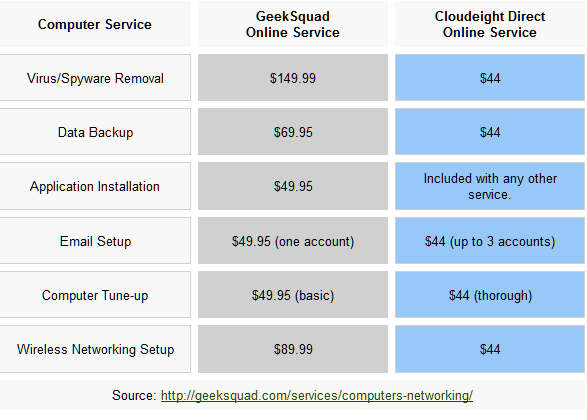 *Our computer tune up is a complete tune up - unlike the 10-minute tune-up Geek Squad offers for $49.99. Wish we could feel good about making $49.99 in ten minutes :-).We offer many other computer services too! If you have a problem with your computer - we can fix it! . Get more information and lock-in our current pricing by getting your Cloudeight Direct Computer Care service keys right now. Our new Two-Session Key is on sale today! You can't beat our service -- or our prices -- anywhere. A comment from Susan
Thank you so very much for the Session Follow-up...I need things like this as my short term memory is extremely poor and unless I write everything down, I can't remember details
Your details below are an excellent reminder of what you did. I am extremely pleased with your services and are recommending you far and wide. Even my husband was very pleased and said it was money well spent. If we hadn't used you, he would have been the one to take our computer in to the shop
We, Bren, Leslie and myself, all who have had great sessions with you, are working on our friend Ce to get her computer fixed by you, hers is such a mess. Too bad you are not in Australia yet. Another graphics friend Tia has recently encountered problems. We also have another friend, Darwin, whom we are encouraging to let you fix his computer which his son messed up.
I have a few other odds and ends that need to be addressed so at a later date I will be buying more keys....I am that pleased with what you did.
I can't thank you enough, not just for the superb service but also your pleasant manner and the way you explained things so that even I, with my fogged brain could understand, and put up with all my questions. You never made me feel like an idiot.
Again, I am just that happy that Leslie told me about Cloud 8....it started with your newsletter and now that you have fixed my computer and given me good advice, I will certainly be using you again if anything else ever crops up....and there is always my new lappy that sometime might need work. THANK YOU SO MUCH
Susan K. Thank you so much, Susan, for your very nice comments and for recommending us to your friends and family members. We are available in Australia and every English-speaking country - including Michigan (sorry EB!). We enjoy helping others and always have - and Cloudeight Direct Computer Care has given us the boost we needed. We both spend long hours doing a job we still love to do after all these years. Cloudeight Direct Computer Care has added a lot to our knowledge of how people use their computers differently and we've learned a great deal from the "Direct" experience. We're extremely pleased when we get emails from our customers expressing their satisfaction with what we've done for them. We get a lot of nice letters from customers and we try to publish one or two of them each week because frankly, it helps us get new customers as we realize that people are sometimes skeptical of a new service. Susan, both of us thank you for allowing us to help you with your computer, for recommending us to others, for your nice comments and your continued support. TC & EB
InfoAve Premium contains over three times as much content as our free edition - help yourself and help us too... Upgrade to InfoAve Premium right now - LIFETIME SUBSCRIPTIONS are now ON SALE!
Special Offers On Computer Related Products Registry Commander - Take command of the Windows registry and save $10.00 off the retail price! Captain Optimizer -- Be the captain of your computer - tweak, control, configure, clean and more! Save $10.00 off the retail price! HubbaDogs! We have 'em. Cute dog-shape 4-port USB hubs. Get yours while we still have them!
COMPUTER TIPS AND TRICKS Have Dropbox, SpiderOak, SugarSync, Skydrive?
Manage all your online storage from a one place
All computer users
Windows, Android, Apple
We have Dropbox accounts, SpiderOak accounts and SugarSync accounts. And next week (rumor has it) Google will announce it's own Dropbox clone with 5GB of free space -- and we'll probably get one of those too.
Online storage is convenient, relatively safe (as long as your passwords are strong) and accessible from just about any connected device. You can access your photos, music, documents and other favorite files from your PC, Tablet or Smartphone. There's a lot of reason to use online storage sites -- not the least of which it's a good place to backup those precious files you cannot replace - a place to back up your backups so to speak
But the problem is - it's a pain to try to keep track of all those different online storage accounts, isn't it? What if you could access them all from one place -- with one (strong!) password. Well now you can with a free* service called -- for some reason -- Otixo.
Note: *Free service limited to 250MB of bandwidth pre month - which is not a great deal but should be just fine if all you're doing is keeping track of what you have stored where).
Here's a little about Otixo from Otixo:
"Manage all your clouds from one login with Otixo. Connect services like Dropbox, Box, SkyDrive, Google Docs, SugarSync, Picasa, MobileMe, Amazon S3, FTP sites and WebDav drives...all from one simple app."
If you want to know more about Otixo or sign up for a free account -- you can do so from https://www.otixo.com/ . Hmmm ... where else would you go?
Not Just Another Clipboard Manager
Windows all versions 32bit & 64bit
We often type the same things over and over. EB is always writing 'get to work you lazy ______' -- she uses various adjectives depending on the day and whether she's sleeping or not. I often write 'I'm sorry EB. I the bluebird sang in the apple tree, and something just got into me.' But why should I have to type the same things over and over and over again....
Like....
Best wishes,
TC
http://thundercloud.net/direct
or
Dear EB,
I hope today finds you in a better mood than you were yesterday, and the day before, and the day before. I'm just writing you to remind you to take your medication. We've got a long day ahead and my cell-phone battery is already low from the 5500 text messages you've sent me already this morning.
With Text I just copy and paste that stuff in and give it EBnice or EBnot and Texter will fill in the text wherever I want it.
See I type in the hotstring ebnice and press enter and....
Dear EB,
I hope today finds you in a better mood than you were yesterday, and the day before, and the day before. I'm just writing you to remind you to take your medication. We've got a long day ahead and my cell-phone battery is already low from the 5500 text messages you've sent me already this morning.
It's really cool and it works with any Windows application that allows you to enter text. I'm sure you can think of a gazillion things you type over and over. Wouldn't it be nicer just to type in a hotstring like ebnice (and hit Enter) than to keep wasting time typing the same old things over and over.
We think Texter is one of the finest free clipboard / text managers money can't buy. We think you'll think so too.
Anyway here's what Texter's author has to say:
"...Unlike software-specific text replacement features, Texter runs in the Windows system tray and works in any application you're typing in. Texter can also set return-to markers for your cursor and insert clipboard contents into your replacement text, in addition to more advanced keyboard macros. Did we mention it's free?..."
For a lot more ideas on how Texter can save you the drudgery of typing the same things over and over again -- and other cool features of Texter please visit this page... http://lifehacker.com/238306/lifehacker-code-texter-windows .
Clearing Adobe Flash History and Cookies in Chrome, Internet Explorer, and Firefox
All Windows Users
Whether your wary of cookies and tracking cookies or not, it's a good idea to delete your browsing history, cookies and temporary Internet files as a matter of good housekeeping. And I have won EB's Good Housekeeping Seal of Approval for keeping such a neat and tidy computer. But really it is a good idea to clear your cookies, temporary Internet Files, and browsing history even if you're, like me, not wary of 'Web trackers'. It's just plain old good housekeeping not to leave a bunch of crumbs lying around.
And we're not going to get into the basics of clearing your browsers' cache here -- most of you know how to do that. But how many of you know that when you clear all the junk from your browser you don't clear those so-called Flash cookies. These are cookies stored when you watch any flash movie - for instance on YouTube. And if you've never deleted them you will be surprised how many you've accumulated.
Clearing out all those Flash cookies and Flash history isn't a browser setting, if it were you wouldn't need this tip. There's a Web page you can visit to clear that Flash junk from your computer. Just visit http://www.macromedia.com/support/documentation/en/flashplayer/help/settings_manager07.html and clear all the garbage left on your computer every time you view a Flash animation or movie.
There's another way to do it too -- but it's more complicated and we like easy and so do you. Right?

THIS WEEK'S FREEWARE PICK FBackup
Works on: Windows XP, Windows Vista, Windows 7
32bit and 64bit
What is it? An easy to use backup program
File size: Approximately 17.7 MB
One thing we always recommend is that everyone have a good backup plan. And we're going to (obviously) beat you over the head with this backup thing until you finally realize we're serious! We realize that created image backups or hard drive clones can be a bit prodigious. That's why we're always looking for easy-to-use, free backup programs -- maybe one of them stick. If it's not easy to use -- no one will use it. We want you to use it so easy is the keyword. This freeware pick is easy to use. It doesn't get much easier. But there are other reasons we don't back up our computers, though we know it's the right thing to do. We're too used to getting up in the morning and firing up the PC and it works - so why worry? Catastrophic computer problems usually happen in the same manner that catastrophic health problems do - one minute you're doing fine and the next minute your world's turned upside down by some sort of serious illness. Not to be morbid or anything, you understand. Just making an astute analogy.
We can't help you with your health problems but we can help you with your computer problems. And even though EB is an R.N. (are you still and R.N.? Is that why you give me blood pressure problems?) I wouldn't let her stick me with a needle, but that's another discussion for another day. But, does the term 'sadist' ring any bells? I must continue because I'm getting cold chills here thinking about needles and EB wearing her nurse's uniform chasing me around a hospital room and me trying to hold my hospital gown closed and run at the same time. She's fast and mean, but I'm faster and meaner!
I'm way off topic here. Getting back to your computer. You know you need to make good backups and you don't do it. Either you don't want to spend $40 to $60 for a really good backup program, or you've just tossed a few bucks in our begging bowl and your broke - just kidding! Well, folks, you're now out of excuses because we've found a free backup program for you that will cost you nothing - nada -zip. It's easy to use so you can't say 'well I would backup my stuff but these darn programs are too complicated for me - I so computer illiterate.' Nope. Won't work this time. You're fresh out of excuses. We've heard them all before. Heck, we've even used some of them. You ought to hear EB when I asked her why she didn't answer an important email of mine! You want to talk about excuses? How about, 'my dog needed to go outside and my laptop blew off the coffee table when I opened the door and the delete key hit the corner and wiped out your email....' Sure! Those Michigan winds really blow hard off Lake Gitchagoomie don't they, EB?
And here's what it looks like:
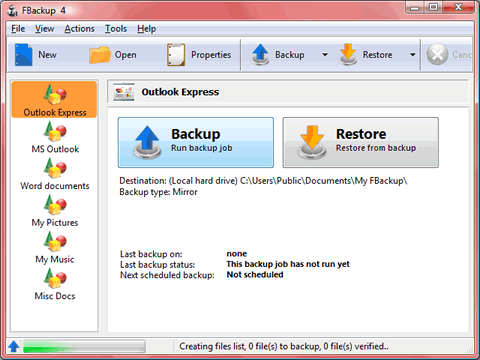
Like me, the developers of our freeware pick of the week are very verbose, thus taking away my beloved opportunity to ramble on inanely as much as usual here. So, without further fuss, I'd like to you to welcome the one and only Billy Shears..... not really. Here is the developer's description of FBackup:
"FBackup is a free backup software for both personal and commercial use. It protects your important data by backing it up automatically to any USB/Firewire device, local or network location. The backed up data can be either compressed (using standard zip compression) or an exact copy of the original files.
It's free for personal and commercial purposes.
FBackup is a backup software free for both commercial and personal use. This means that you can save some money by not having to buy another backup program.
Automatic backups.
You define a backup job, set it to run automatically, and forget about it. FBackup will automatically run the backup at the scheduled date, so you have the benefit not only of having your data protected, but you'll also save precious time.
Backup with standard zip compression.
When using the full backup type, the sources will be archived using standard zip compression. FBackup uses ZIP64 compression, which means that it can create zip files over 2GB in size. Furthermore, you can protect the zip file by requiring a password for extracting data from it.
Exact copies of files.
If you don't want to have the files stored in one zip file, FBackup can make exact copies of the backup sources. Since FBackup will also back up empty folders, you can use this backup type to create in the destination a 'mirror' copy of the original files.
Run actions before/after backup.
For each backup job you can define an action to execute before or after the backup. As an example, you can set a 'Clear backup' action before the backup runs, so that all the previous backed up files will be cleared before loading the new ones. As an after-backup action, you can set it to stand by, log off, hibernate or even shut down the computer once the backup successfully finished.
Easy to use.
The two main functions of a backup program are the backup and restore operations. FBackup makes them easy for you, by offering friendly wizards. You start a new backup wizard, select what, where, how and when to backup, and the backup is ready to run. If you have to restore files, you'll open a restore wizard and it will ask you where you want the files to be restored.
Automatic updates.
FBackup automatically checks for updates weekly, so you'll know when a new version is released. The option to check for updates can be disabled, but we recommend to let it enabled so that FBackup will be up-to-date.
Multiple backup destinations. By default the location where your backups will be stored is the local windows partition. To be sure you have a secure backup, you'll need to store the backups on other destinations supported by FBackup (such as an external USB/Firewire drive, or on a mapped network drive). This way, if your computer would suffer a hardware failure, you'll have your data safe on an external location.
Backup plugins.
You can load plugins for backing up or restoring specific programs' settings or other custom data (like game saves, email data, etc.). Once loaded in FBackup, these plugins will add in the Predefined Backups list the sources needed to be backed up for that particular program. You can see a list of all the available backup plugins here: Free Backup Plugins.
Backup open files.
If a file is in use by another program at the time of the backup, FBackup will still be able to back up that file, because it uses the Volume Shadow Service that Windows provides. So, as long as you're on Windows XP, Windows Vista, Windows 2003 Server or Windows 2008 Server, FBackup will back up those open files. As an example, you will be able to back up your Outlook emails and settings without closing it first...."
Backup, backup, backup my fellow computer users - or someday you're going to wish you had taken our advice - maybe not today, maybe not tomorrow, but someday .... Our freeware pick this week is FBackup. You have no excuse not to keep a good set of backups now, do you? You can learn more about and/or download FBackup from the FBackup Web site. Tell them that old TC and EB sent you, they'll be terribly confused.
Now go get this free mirror-image/file-based backup program and a good external hard drive and back your computer up before it's too late. All the details and the download link can be had by just visiting this not-so-beautiful Web site. http://www.fbackup.com/ . But hey, the program looks and works great! Do you have a freeware program you love? Tell us about it!
This week's essay Romance Novel Heroes I read a lot of books. I don't often get books at the library because I seldom remember to take them back. I've paid too many $50.00 fines. Now, I just buy books, it's cheaper. I buy a lot of books - mostly paperback books because I'm cheap. But I have bought a few hardback books over the years too, most of them were for display purposes only. I like to fill my bookshelf with books I've never read so I appear erudite and scholarly to those who visit my home. This could be a real ego-booster. I dream about visitors to my home catching site of my well-stocked bookshelf and envying my bevy of leather-bound books with enigmatic titles like "The Reproductive Cycle of Canadian Fresh Water Lobsters: An Abstract." I can hear them gasp in amazement and drool with admiration. I'd be so puffed with pride. But I don't have many visitors to my home unless you want to count the cable guy who comes to fix my cable Internet six or seven times a month. He's been here so many times, he makes his own coffee. I don't think he reads many books though. I'm not even sure he knows how to read. I'm not even sure he knows how to fix my Internet connection - but he sure makes a great cup of coffee. Anyway, forgive my digression... Read the rest of "Romance Novel Heroes" here.
Our Information Avenue Web Site The best of our tips and tricks, freeware picks and more are now online! You can leave your comments, make suggestions, and give us your feedback on our new interactive Information Avenue Web site. As of today there are 300+ freeware picks, 800+ computer tips and tricks, and a lot more information on our new Information Avenue web site. And we add more tips, tricks, freeware picks, featured articles and more - every day! You'll find our new site-search feature helps you find the information you want - instantly! Give it a try. We think you'll find our new InfoAve site a great place to go if you're looking for past freeware picks, tips and tricks or other computer information. Just type what you're looking for in the site search and if we've got it, you'll find it. It's easy and it's very fast. Please come visit our Information Avenue Web site. We're sure you'll find something you can use every time you visit. We update that page every day. And you can leave your comments after any article.
And you can get new tips, tricks, freeware picks, and more each day via email - subscribe to our FREE InfoAve Daily newsletter. It's free and it's sent every evening around 7:00 P.M. Eastern time (USA).
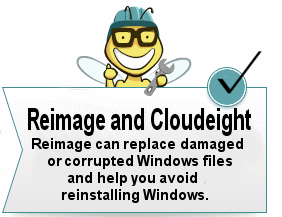
Wait! Don't reinstall Windows! Read this first! SPECIAL NEW LOW PRICE FOR CLOUDEIGHT SUBSCRIBERS ONLY!
Just $39.99 for one year of Reimage - and unlimited repairs. Until now, if you're computer had corrupted or damaged Windows system files, there was only one way to repair the damage: reinstall Windows. But that means if you don't have your files backed up (and you should, you know) - you're going to lose everything, not to mention all the personalization and settings changes you've made. It's a hassle to reinstall Windows; it means hours or days - or even weeks - trying to get your computer back to the way you want it. Try Reimage right now! But now you don't have to resort to reinstalling Windows - you can choose to use Reimage. Reimage keeps an huge inventory of Windows system files to replace or repair any missing or corrupted files on your Windows XP, Windows Vista or Windows 7 computer. And with a money-back guarantee, you've got nothing to lose but the aggravation of installing Windows. If your computer is at the point where you're seriously consider reinstalling Windows - stop. Try Reimage first. We think you'll be glad your did! Get more information and or try Reimage right now. Reimage can replace and repair critical Windows system files and save you from the hassle of reinstalling Windows. Try Reimage right now!
 Visit Our Donation Station
Thanks again for subscribing to Information Avenue Free Edition. Have a nice weekend. Best wishes, Eightball & Thundercloud
Cloudeight Information Avenue Free Edition - Issue #534
April 21, 2012 Questions? Comments? Suggestions? We're always glad to hear from you! If you need to change your subscription address or wish to unsubscribe from this newsletter :( click "Manage my subscription" at the very bottom of this newsletter.
Share this newsletter with your friends! Forward this newsletter or send a link to this newsletter online at http://thundercloud.net/infoave/archives2012/week-534.htm . We'd appreciate it and maybe your friends would too! . PLEASE CLICK HERE TO READ THIS IMPORTANT DISCLAIMER
This newsletter is published weekly by:
Cloudeight Internet LLC
PO BOX 73
Middleville, Michigan USA 49333-0073 |






0 comments:
Post a Comment