| Dear Friends, Welcome to Issue #533 of InfoAve Free Edition! Thank you very much for subscribing to our free InfoAve Newsletter. If you need to change your subscription or you wish to unsubscribe from our newsletter and break our hearts, click "Manage my subscription" at the very bottom of this newsletter. About SUPERAntiSpyware You'll notice that links are missing for our SUPERAntiSpyware offer in today's issue. This is because they have decided not to sell lifetime subscriptions anymore - either directly or via affiliates. We're in the process of negotiating with them and trying to get you the best deal we can on a multi-year license. Hopefully we will have some good news on that soon. Thank you for very much for your support.
Cloudeight Direct Computer CareWe can fix your computer!
We all know that sooner or later our computers are going to start having problems. We can help you with any computer need -- from diagnosing and fixing Windows problems - to setting up a wireless network for you - to safeguarding by creating an image-based backup (the only kind that really works when you really need it to work) - to cleaning up your computer and optimizing it -- and more. We can do almost anything you need done and we guarantee our work - you're either satisfied or we'll refund your money. Compare our Prices and Experience!
We'd like to show you how our current prices compare to a leading computer repair service. And remember - Geek Squad "technicians" get two-weeks of training, but we've been helping people with their computers for over 12 years. 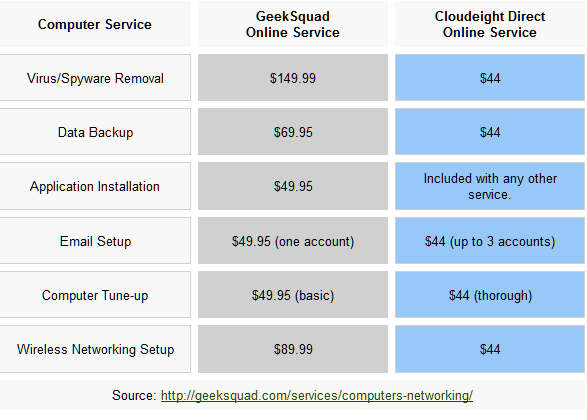 *Our computer tune up is a complete tune up - unlike the 10-minute tune-up Geek Squad offers for $49.99. Wish we could feel good about making $49.99 in ten minutes :-).We offer many other computer services too! If you have a problem with your computer - we can fix it! . Get more information and lock-in our current pricing by getting your Cloudeight Direct Computer Care service keys right now. Our new Two-Session Key is on sale today! You can't beat our service -- or our prices -- anywhere. A comment from Kerryn
It was a very interesting experience having TC and EB access my computer remotely to try and work out what was wrong with it. Apparently it was quite an unusual problem and they had to go through over 60 services and stop each one to find out which was causing the problem as my CPU was running at nearly 100% constantly.
My computer is pretty old but I still need it for work and Cloudeight Direct repair service, at a reasonable cost, has enabled me to keep it going until I can afford another desktop.
I was impressed by their work and fully intend to purchase another repair key for future use.
Many thanks Cloudeight.
Kerryn
Thank your very much, Kerryn. It was very nice working with you and helping you with your computer. We appreciate your support, your kind words, and thank you for choosing Cloudeight Direct! TC & EB
QUESTIONS AND ANSWERS Susan misses her Snipping Tool
Hi guys. Really love your newsletters. This is no big problem but it's annoying me. I know you guys can help. My Snipping Tool is missing from Windows 7. I typed Snip in the start menu search but nothing came up. Is there somewhere I could download it so I have it on my computer again. I don't use it all the time but there are times when I need it. Of course now is one of those times and it's gone! Thanks.
Our answer
Thanks Susan. I'm sure we can help you find your Snipping Tool and get it back on your start menu or taskbar - whichever you prefer. Try this:
1. Open Windows Explorer (Windows Key + E)
2. Double-Click on your "C" drive .
3. Double-Click on the "Windows" Folder. You may be notified that the files in this folder are essential system files and should not be altered or deleted. Go ahead and proceed despite the warning.
4. Scroll down and find the folder labeled "System32". Double Click on it.
5. Arrange the files alphabetically by name (click on Name to sort by name) and scroll down to the "s" section. The file you are looking for is called "SnippingTool.exe".
Once you've found it, right-click on it and choose "Pin to Start Menu" or "Add to Taskbar" - whichever you prefer. This will create a new shortcut to the Snipping Tool in your start menu or on your task bar.
You can, if you wish, right-click on SnippingTool.exe and choose "Send To" then "Desktop (create shortcut)" from the right-click menu instead. This will create a snipping tool shortcut on your desktop.
Just be careful you don't delete or move SnippingTool.exe from the System32 folder though. Then you will have big problems.
Raymond almost falls for the Microsoft Phone Phishing Scam
I guess I'm just gullible. I received a call from a man with an Indian accent claiming to be from Microsoft. He told me that my computer had come up as "infected" and gave me a code that would allow me to connect with a Microsoft technician to clean my system. You won't believe this but I actually entered a code provided by the first caller - but then I got very suspicious. and I stopped.
What has me concerned is do you think this infected my XP computer? I remembered reading your article about running System Restore right away at the first sign of trouble but I don't know if this would be enough. Do you think I should I reinstall XP just to be safe? Should I be doing something else?
Anything you can tell me would be much appreciated.
Our answer
You almost got yourself in trouble but you did the right thing. If you think about it - it's not hard for some criminal to call you at random and tell you that your Windows computer has shown up as one that was infected -- then offer to "fix" it for you. There are about 1 billion Windows computers in the world -- and odds are that about 5 of 7 phone calls are going to end up going to someone with a Windows computer in their home.
System Restore will remove any executables that were installed subsequent to the restore date you chose. Since any malware or spyware or Trojan would be an executable, running System Restore and using a any restore point created prior to the phone call would be sufficient to remove whatever (if anything) the criminals installed You may want to scan your computer with a good online scanner -- or with Malwarebytes just to make sure. But my bet is that System Restore has removed any infection that may have been injected on your computer during that call.
Here's something from Microsoft that should help you and everyone else too.
"BEWARE - Users have been reporting they have received phone calls, some claiming to be from "Microsoft", telling them that that their computers are infected. The caller asks the User if they are online and if their computers are performing slowly.
If their computers are not running, they will ask the User to boot the system and report on the start up time or, if the system is running and online, they will tell the User that a tech can take over control of it and clean a "virus infection".
This is a scam.
If you happen to receive one of these phone calls ask the caller for the name of the company, where they are located, and their phone number.
Then hang up and report this to:
IC3 (internet crime) http://www.ic3.gov/
Your Local FBI Office ( if you're in the US) http://www.fbi.gov/contact/fo/fo.htm
Microsoft will never , repeat, NEVER , cold call people who use Windows.
NEVER allow strangers to take over your computer.
If you have not called any tech support center for assistance then NEVER allow anyone who calls you unsolicited to take over control of your computer. "
You did the right thing by running System Restore right away. It's the smart thing to do if you even suspect in the slightest that your computer as been infected. Running a restore point which dated previous to the suspected infection will restore your computer back to the state it was in at the time the restore point was created.
InfoAve Premium contains over three times as much content as our free edition - help yourself and help us too... Upgrade to InfoAve Premium right now - LIFETIME SUBSCRIPTIONS are now ON SALE!
Special Offers On Computer Related Products Registry Commander - Take command of the Windows registry and save $10.00 off the retail price! Captain Optimizer -- Be the captain of your computer - tweak, control, configure, clean and more! Save $10.00 off the retail price! HubbaDogs! We have 'em. Cute dog-shape 4-port USB hubs. Get yours while we still have them!
COMPUTER TIPS AND TRICKS Using a common Windows tool to check your system performance
Windows XP, Vista and Windows 7
Most of you have used Task Manager before -- usually to close a program that is frozen or to see what processes are running in the background. But there's another use for Task Manager that can really help you diagnose your Windows miseries :-) .
That's right - that common everyday program that's built into every version of Windows will let you see at a glance why your computer's running so well or running like a drunken three-legged tortoise.
Open Task Manager by pressing the Ctrl + Shift + Esc keys (yes there are many other ways to open it but this saves me typing since that shortcut works on all versions of Windows). When Task Manager opens you'll see several tabs at the top. The one we're concerned with here is the Performance tab. So click the Performance tab and view along with EB and TC.
See?

You can see from the screen shot above (taken on a Windows 7 computer) that you can quickly view your RAM and CPU (processor) usage. If your RAM is low or your CPU is nearing 100% usage -- you're computer is going to be running mighty slowly. If both your RAM is low and your CPU usage stays near 100% or a few minutes -- you have problems there my friend. And you have some digging around to do.
Class dismissed!
Windows XP: Less than two years to go until the end of support
Windows XP
Many of you are still using Windows XP - we know this not only because statistics say that over 35% of people are still using Windows XP but because we've had the opportunity to work with many XP users with our Cloudeight Direct Computer Care service.
We want to let you know that the two-year countdown to the end of support for Windows XP has begun. On April 8, 2014 Windows XP support will end and those of you still using it by then will be left using a system that wil pose many security risks.
Windows XP was a great operating system and we know how hard it is to let go of the familiar and start using something unfamiliar. But we also remember the great reluctance of Windows 98 and Windows ME users to switch to Windows XP. Many of those are the same folks who are now are not willing to let go of XP. It's fine to keep using XP as long as Microsoft continues to provide updates and security fixes for it.
But XP is aging and the computers running it are aging and the problems you'll experience will keep increasing. Some of you who are using XP will have no choice but to get a new computer because the old XP system has finally given up the ghost.
If you're planning on holding out as long as possible with your old XP computer and then moving to Windows 8 (or Windows 9) when Microsoft terminates support for XP -- we'd like to offer you a suggestion. Don't wait that long - your current system may not make it that long. The worst possible situation you can put yourself in when buying something as expensive as a new computer is to be in a position of having to buy a computer rather than having the luxury of shopping for one.
The best deals on laptops and desktops will come right before the release of Windows 8. Retailers and computer manufacturers will be offering discounts to clear out the Windows 7 computers before the official launch of Windows 8. Not only will prices be substantially lower, but in the two or three months before the official release of Windows 8 - many computer manufacturers will be offering free upgrades to Windows 8 when it's released. So not only will you save money on the computer but you'll save an additional $100 or so on the upgrade to Windows 8. Plus you'll have the option to stick with the brand new Windows 7 computer or to upgrade it to Windows 8.
There is nothing wrong with trying to keep that old computer running as long as you possibly can. But age is taking its toll -- and the Windows XP end-of-support clock is ticking. If you're thinking of hanging in there until support ends -- don't. You'll get a much better deal by shopping for a Windows 7 computer in August or Septemeber of this year -- than you will if you wait until April 2014 when you'll have to buy a new computer -- or else take your chances working on a computer that will pose serious security risks.
It's up to you, of course. But we think you'll find our advice will save you money and afford you the luxury of shopping or a computer when you don't absolutely have to buy one -- rather than waiting until you absolutely have to buy a computer.

THIS WEEK'S FREEWARE PICK Ghostery
Interesting Web cookie detective, information tool - and more
Windows XP, Vista, Windows 7
Add-on/Extension for Internet Explorer, Firefox, Chrome, Safari, and Opera
Size varies by browser (small download though)
Ah yes. The fervor mounts as anti-tracking cookie zealots spew their anti-tracking cookie vitriol on blogs, tech sites, newspapers, radio, and television. Why they have created a virtual army of anti-tracking-cookie haters whose paranoia can be catching. If you come down with a bad case of paranoia it can cloud your vision and blind you to really important threats like malware and phishing. And that's the biggest threat with tracking cookies -- they grab your attention away from far more serious dangers.
But don't worry -- we're not going to get into the tracking-cookie debate. My favorite cookies are still chocolate chip and my fear of tracking-cookies is about as great as my fear of Jet-Puffed Marshmallows. That being said, just because we don't feel tracking cookies are a threat doesn't mean we don't think it's not interesting to see how many things do track you on the Web. And I use the term "track" loosely. I don't know what other term to use...how about follow? Nah. Too sinister. How about take note of you? Yes...more like it - but too long. How about tag you. That's it. Tag you. They tag your browser like marine biologists tag whales to see where they go when the swim out to see. So we'll call them tagging-cookies. How's that.
It's interesting so see who or what is tagging you -- not so you can cower in fear but so you can see how they work -- and maybe even learn that for the most part, tagging cookies are rather benign and designed to induce to click advertisements by showing you advertisements the tagging-cookie gurus think you'll be more likely to click. That doesn't mean you have to click anything though. But I'd rather see an advertisement for fresh grilled salmon than an advertisement about toe nail polish. I don't use it myself -- I realize I'm not typical :-)
Ghostery is a browser add-on that shows you who is tagging you and what sites tag you the most. It always allows you to block those nasty old tagging cookies if you wish. But that's not why we're featuring Ghostery as a freeware pick. We are featuring it for educational purposes only. We realize of course that's like a drug store selling wine during prohibition and labeling it "Chardonnay -- for medicinal purpose only". So we know that some of you will not be able to resist using it's tagging-cookie blocker to block those tagging-cookies. Just remember: Doing so does not increase your personal privacy at all -- but if you think it does -- go for it :-) Whatever gets you through the night, eh?
Since you're yawning by now, I'll wake you up by bringing Ghostery's developers in to add to your malaise:
"Be a web detective.
Ghostery is your window into the invisible web – tags, web bugs, pixels and beacons that are included on web pages in order to get an idea of your online behavior.
Ghostery tracks the trackers and gives you a roll-call of the ad networks, behavioral data providers, web publishers, and other companies interested in your activity.
Build an information foundation.
Each of the over 500 companies has a profile that will help you learn more about their technology, their business, and their privacy policies.
At Ghostery, we believe in enabling informed decisions about your control over your online privacy. The more you learn about the companies trading your online behavioral data, the better you can make decisions about how to control your exposure to those companies.
Ghostery allows zero-tolerance blocking of anything ad related, complete (visible) open communication with ad companies, or countless measures in between - determined by you, the informed web user."
Yes indeedy folks - you can be a Web detective. Get out your pipe, don your Sherlock Holmes hat, download Ghostery's add-on/extension for your favorite browser and see who's tagging you. If you really think it will protect your online privacy to block those naughty taggers -- do it. Ghostery makes it pretty easy to block every tagging cookie if you wish. Just remember that many sites on the Web are free because they run advertisements -- just like your favorite broadcast TV shows. So blocking tagging cookies means no dinero for the Web site. If your comfy with starving some poor Web entrepreneur out of a few pennies -- go ahead and block those nasty cookies.
As we said - we've featuring Ghostery for its educational value -- not for its tracking err tagging-cookie blocker. In any case it's an interesting browser add-on extension that comes in many flavors: Internet Explorer, Firefox, Opera, Chrome and Safari. That pretty much means they have a flavor for you.
Just for fun -- here's a screen shot showing CNN tagging me. Oooh I shrink in fear!
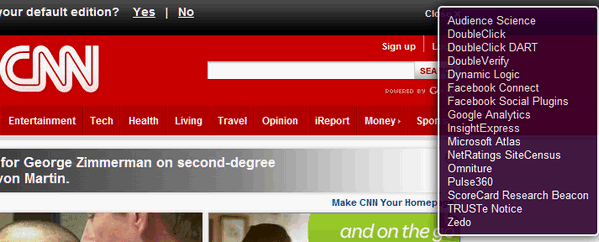
Ghostery showing me all the stuff that CNN does! Bad CNN! You can learn more about and/or download Ghostery from http://www.ghostery.com/ Do you have a freeware program you love? Tell us about it!
This week's essay Jelly Donut Trollop
There is nothing like a pleasure delayed.
For the past several weeks I have had an overwhelming, almost prurient yearning for a jelly donut. Why? I don't know. But these yearnings are seated, no doubt, deep in the part of the brain's least understood by scientists. This is the part of the brain that causes people to eat Big Macs, cream sticks, cake, cookies, and yes, jelly donuts. It's the "sweet-fat-salty lobe" and it's located really close to the procreation lobe. Desires that are born in the sweet-fat-salty lobe flare up from time to time and they are almost impossible to ignore. Yes some of the more depraved among us can try to ignore these primal urges. Others, like me, delay or deny these urges until they become so intense we can no longer ignore them. The more overtly obese folks do the right thing from the start - they throw caution to the wind, laugh in the face of mortality and instantly give in to any and all food cravings with lusty delight.
As usual, I tried to trick myself by taking the circuitous route to instant gratification. Read the rest of this essay here.
Our Information Avenue Web Site The best of our tips and tricks, freeware picks and more are now online! You can leave your comments, make suggestions, and give us your feedback on our new interactive Information Avenue Web site. As of today there are 300 freeware picks, 800 computer tips and tricks, and a lot more information on our new Information Avenue web site. And we add more tips, tricks, freeware picks, featured articles and more - every day! You'll find our new site-search feature helps you find the information you want - instantly! Give it a try. We think you'll find our new InfoAve site a great place to go if you're looking for past freeware picks, tips and tricks or other computer information. Just type what you're looking for in the site search and if we've got it, you'll find it. It's easy and it's very fast. Please come visit our Information Avenue Web site. We're sure you'll find something you can use every time you visit. We update that page every day. And you can leave your comments after any article.
And you can get new tips, tricks, freeware picks, and more each day via email - subscribe to our FREE InfoAve Daily newsletter. It's free and it's sent every evening around 7:00 P.M. Eastern time (USA).
Wait! Don't reinstall Windows! Read this first! SPECIAL NEW LOW PRICE FOR CLOUDEIGHT SUBSCRIBERS ONLY!
Just $39.99 for one year of Reimage - and unlimited repairs. Until now, if you're computer had corrupted or damaged Windows system files, there was only one way to repair the damage: reinstall Windows. But that means if you don't have your files backed up (and you should, you know) - you're going to lose everything, not to mention all the personalization and settings changes you've made. It's a hassle to reinstall Windows; it means hours or days - or even weeks - trying to get your computer back to the way you want it. Try Reimage right now! But now you don't have to resort to reinstalling Windows - you can choose to use Reimage. Reimage keeps an huge inventory of Windows system files to replace or repair any missing or corrupted files on your Windows XP, Windows Vista or Windows 7 computer. And with a money-back guarantee, you've got nothing to lose but the aggravation of installing Windows. If your computer is at the point where you're seriously consider reinstalling Windows - stop. Try Reimage first. We think you'll be glad your did! Get more information and or try Reimage right now. Reimage can replace and repair critical Windows system files and save you from the hassle of reinstalling Windows. Try Reimage right now!
 Visit Our Donation Station
Thanks again for subscribing to Information Avenue Free Edition. Have a nice weekend. Best wishes, Eightball & Thundercloud
Cloudeight Information Avenue Free Edition - Issue #533
April 14, 2012 Questions? Comments? Suggestions? We're always glad to hear from you! If you need to change your subscription address or wish to unsubscribe from this newsletter :( click "Manage my subscription" at the very bottom of this newsletter.
Share this newsletter with your friends! Forward this newsletter or send a link to this newsletter online at http://thundercloud.net/infoave/archives2012/week-533.htm . We'd appreciate it and maybe your friends would too! . PLEASE CLICK HERE TO READ THIS IMPORTANT DISCLAIMER
This newsletter is published weekly by:
Cloudeight Internet LLC
PO BOX 73
Middleville, Michigan USA 49333-0073 |






0 comments:
Post a Comment