


OS X Daily: “Watch System Activity and CPU Usage from the Mac OS X Dock” plus 1 more |  |

| Watch System Activity and CPU Usage from the Mac OS X Dock Posted: 30 Mar 2012 08:42 AM PDT
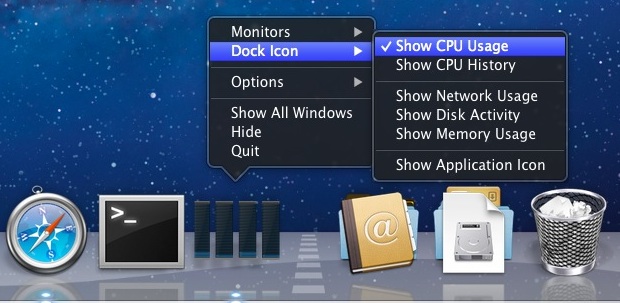
Activity Monitor can be used for more than just managing tasks and killing processes, it can also turn the Mac OS X Dock into a live system monitor where you can keep an eye on processor usage, CPU history, network activity, disk activity, or RAM use.
If you find yourself using this often, you may want to pin Activity Monitor to the Dock by right-clicking and choosing “Keep in Dock” from the Options submenu. Here is what the memory usage pie chart looks like: And here is what Disk Activity and Network Activity look like: If the Dock isn’t your thing, the iStat Menu bar item offers similar features in the menu bar. Thanks to Roman for the tip idea
|
| Lock the Mac Desktop from the Command Line Posted: 30 Mar 2012 08:03 AM PDT
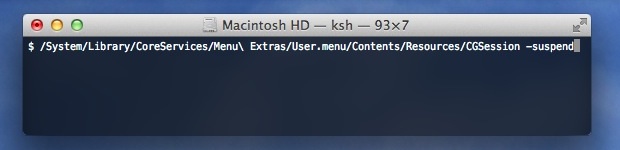
With the help of a buried menu item, we can lock the Mac OS X screen right from the Terminal. This does not log a user out, it just brings up the standard Mac OS X lock screen and login window, requiring a valid user and password before the Mac can be used again. Open Terminal and enter the following in a single line:
There isn’t any confirmation, the desktop is immediately locked and the lock screen appears regardless of what is currently going on with the active user account. For those wondering, the menu item being used is the same Fast User Switching menu that displays a user name in the upper right corner, and the lock screen shown is identical to what is summoned if one were to select “Login Window…” from that same menu. You can lock a screen using a keyboard shortcut as well, but using the command line offers two obvious advantages; it can be included within scripts or entered from SSH to remotely lock a Mac.
|



| You are subscribed to email updates from OS X Daily To stop receiving these emails, you may unsubscribe now. | Email delivery powered by Google |
| Google Inc., 20 West Kinzie, Chicago IL USA 60610 | |
0 comments:
Post a Comment