


OS X Daily: “iPad 3 Release Set for March 16?” plus 4 more |  |

- iPad 3 Release Set for March 16?
- Track Shipments Quickly from iOS
- OS X 10.7.3 Supplemental Update Fixes Problems with Time Machine Backups
- Turn iPhone into a Giant 1990′s Flip Phone
- How to Resolve a “Partition Failed” Error in Mac OS X
| iPad 3 Release Set for March 16? Posted: 06 Mar 2012 10:27 AM PST
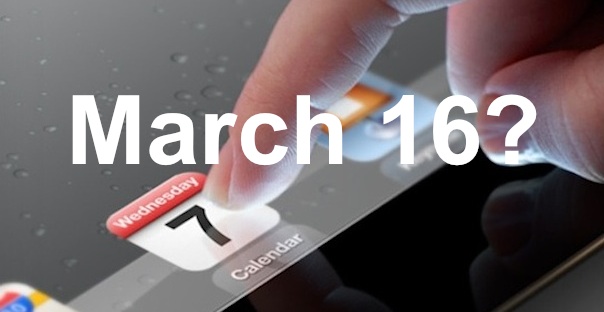
The next iPad may be released to the public on Friday, March 16, just 9 days after the products launch. It remains unclear whether pre-orders will be possible before then. This information comes to us from 9to5mac, who cites a reliable source within Apple Stores who noted that significant preparations are being made for an event on that date. Additionally, two new Apple Stores are expected to open ahead of schedule on the same Friday, providing further evidence of a meaningful Apple event occurring that day. iPad 3 is anticipated to have a high resolution retina display, much faster processors, improved graphics capabilities, and 4G LTE connectivity. Pricing should be the same as existing iPad models, starting at $499 and going up incrementally from there. There is some question regarding the actual name of the device, with some rumors surfacing yesterday that the next generation iPad may in fact be called “iPad HD” rather than “iPad 3″, though the naming convention is largely irrelevant beyond marketing of the device and is not expected to have any impact on the feature set. Stay tuned, we’ll know more tomorrow.
|
| Track Shipments Quickly from iOS Posted: 06 Mar 2012 04:19 AM PST
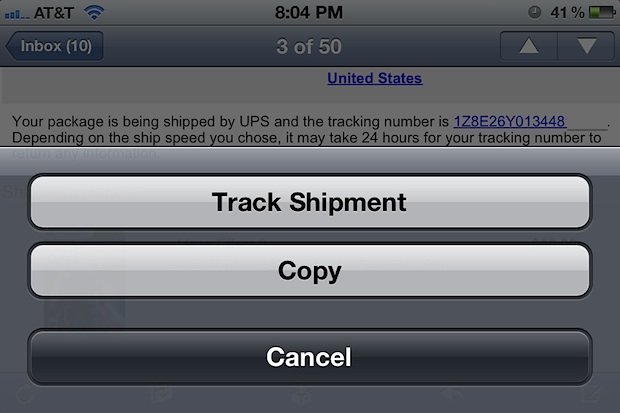
iOS automatically detects tracking numbers found in emails, notes, and messages and turns them into clickable links. To access this feature, all you need to do is open a message containing a tracking number and then:
Choosing the “Track Shipment” option will launch Safari with the appropriate shipping services tracking page. iOS is smart enough to differentiate between Fedex, UPS, DHL, and probably other tracking services as well. If you choose “Copy” instead, the tracking number is copied to the clipboard as expected, and you’ll have to handle tracking yourself, either through an app or webpage. This feature has been around a while and should work on any iPhone, iPad, or iPod touch running iOS 4 or later.
|
| OS X 10.7.3 Supplemental Update Fixes Problems with Time Machine Backups Posted: 05 Mar 2012 01:42 PM PST
Apple has released a supplemental update to Mac OS X 10.7.3 to address a potential issue with restoring from Time Machine backups. The update can be found from Software Update via the Apple menu or downloaded directly from Apple. Installing the update does not require a reboot. Despite being a minor update, it is good maintenance practice to keep Mac OS X software up to date and it’s recommended to download for all OS X Lion users who rely on Time Machine for backing up their Macs.
|
| Turn iPhone into a Giant 1990′s Flip Phone Posted: 05 Mar 2012 12:04 PM PST
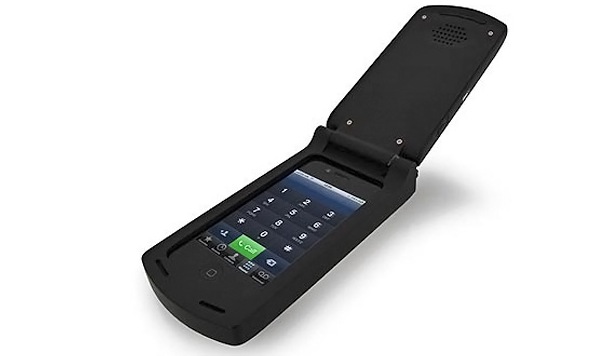
Remember the old flip phones? Of course you do, they were huge and ugly and half of them wouldn’t fit in a pocket even when folded up, but oh were they cutting edge in 1998. Soon you’ll be able to have that same terrible user experience with the iPhone. From the company who brought you the ridiculous 80′s block iPhone case comes a late 1990′s early 2000′s giant flip-phone case for the iPhone. It’s both hideous and hilarious, and it will certainly be popular in that laughably retro stupid way. Unfortunately it’s not available quite yet, we’ll all have to wait until later in the year to grab the flip case for about $24, so put it on your Christmas list.
|
| How to Resolve a “Partition Failed” Error in Mac OS X Posted: 05 Mar 2012 11:40 AM PST
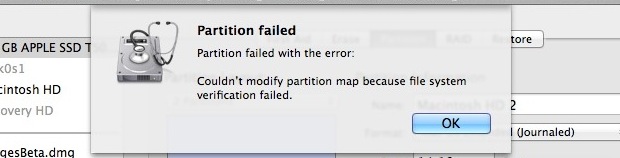
If you have attempted to partition a drive from Mac OS X and received a “Partition failed” message with the error “Couldn’t modify partition map because file system verification failed.” you can fix the problem with the file system check command line utility. To do this properly, you’ll need to boot into Single User Mode as well:
Boot the Mac as usual and relaunch Disk Utility to verify the disk. Go ahead and partition the drive as usual, this time without any such error message. I have encountered this error a few times when partitioning the boot drive from OS X Lion, most recently after a clean installation when setting up dual boot for OS X Lion and Mountain Lion. The cause of this remains to be seen, and repairing the disk from Disk Utility itself doesn’t work, even when in Single User Mode or when booting from another drive.
|

| You are subscribed to email updates from OS X Daily To stop receiving these emails, you may unsubscribe now. | Email delivery powered by Google |
| Google Inc., 20 West Kinzie, Chicago IL USA 60610 | |
0 comments:
Post a Comment