


OS X Daily: “Can’t Download iOS 5.1? Try These Fixes” plus 2 more |  |

- Can’t Download iOS 5.1? Try These Fixes
- Convert Bit Rate of Songs on iOS Devices with iTunes 10.6
- How to Use the Lock Screen Camera in iOS 5.1
| Can’t Download iOS 5.1? Try These Fixes Posted: 09 Mar 2012 10:02 AM PST
Changing DNS in iOS
Change DNS in OS X
On a Mac you may need to follow this up with flushing DNS cache, so open the Terminal and type the following:
Now try opening iTunes and updating, or try to download iOS 5.1 firmware directly from Apple again. An unrelated but pleasant side effect of changing DNS can be that your wi-fi speeds increase, give it a try and let us know if it works for you. Thanks to Aygie and Sayed for the DNS tips!
|
| Convert Bit Rate of Songs on iOS Devices with iTunes 10.6 Posted: 09 Mar 2012 08:57 AM PST
iTunes now allows you to convert higher bit rate songs to three options: 128 kbps, 192 kbps, and 256 kbps. Enabling this option lets you save storage space on an iPhone, iPod touch, or iPad by compressing the music stored on the device. Here’s how to do this:
Depending on how much music you have on the iPhone/iPod the conversion process may take a while. If you want decent compression while maintaing music quality, 192 kbps is a happy medium. This option is available only to those using iTunes 10.6 or later. Prior to iTunes 10.6, users only had a single option, which was to convert the bit rate to 128 kbps. You will definitely save a lot of space with 128kbps compression, but audio quality does suffer slightly, though how much that is noticeable to you probably depends on your hearing and the quality of speakers or headphones you are listening to music with. Nice find by MacStories
|
| How to Use the Lock Screen Camera in iOS 5.1 Posted: 08 Mar 2012 02:22 PM PST
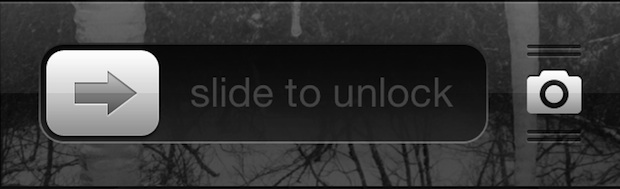
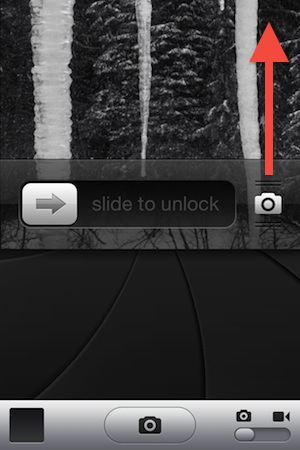
You may have noticed that iOS 5.1 changed the behavior of the lock screen camera compared to it’s predecessor, this has caused some confusion as to how it works compared to iOS 5. You’ll notice that if you tap on the camera icon now it just causes the screen to bounce. No, the bouncing screen doesn’t mean the camera isn’t working anymore, it’s aim is to indicate how it works. You now swipe up to activate the lock screen camera in iOS 5.1. Likewise, you can swipe down to deactivate the camera and return back to the lock screen.
Get used to the new gesture, it’s actually faster than the double-tap home button method before in iOS 5, and you’ll be able to take pictures quicker than ever after you get accustomed to it. There also doesn’t seem to be a way to return to the old behavior anyway, so old habits will have to be broken here.
|
 iOS 5.1 was released a few days ago but some people are still having problems when trying to update. The download can time out, not start at all, or sometimes throw an error message saying “The network connection could not be established.” If you’re having trouble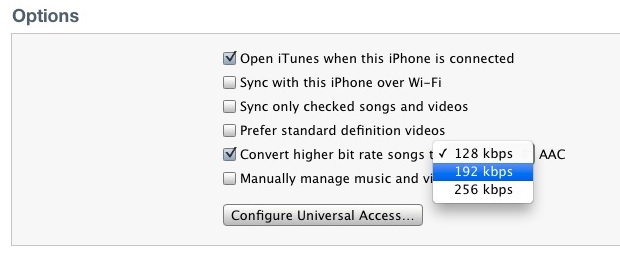
| You are subscribed to email updates from OS X Daily To stop receiving these emails, you may unsubscribe now. | Email delivery powered by Google |
| Google Inc., 20 West Kinzie, Chicago IL USA 60610 | |
0 comments:
Post a Comment