


| |
| Home | Cloudeight Home | Forum | Premium Subscriptions | InfoAve E-book | Donation Station |
| Cloudeight Information Avenue - Issue #531 - March 31, 2012 - Read this issue on the Web |

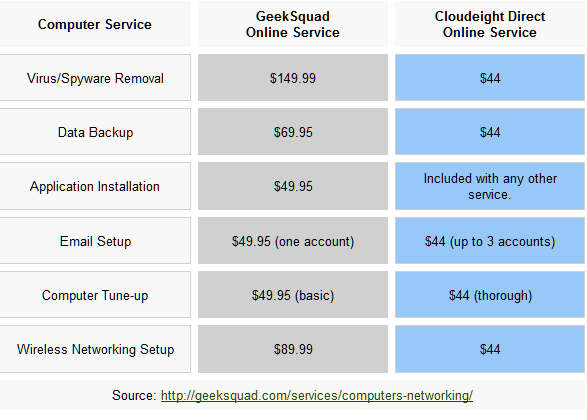
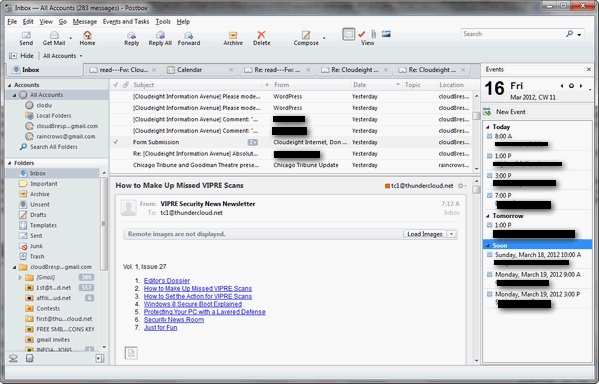
| Dear Friends, Welcome to Issue #531 of InfoAve Free Edition! Thank you very much for subscribing to our free InfoAve Newsletter. If you need to change your subscription or you wish to unsubscribe from our newsletter and break our hearts, click "Manage my subscription" at the very bottom of this newsletter. Thank you for very much for your support. Cloudeight Direct Computer Care We can fix your computer! Compare our Prices and Experience! *Our computer tune up is a complete tune up - unlike the 10-minute tune-up Geek Squad offers for $49.99. Wish we could feel good about making $49.99 in ten minutes :-). We offer many other computer services too! If you have a problem with your computer - we can fix it! . Our new Two-Session Key is on sale today! You can't beat our service -- or our prices -- anywhere. A few of the many comments we received last week from our Cloudeight Computer Care CustomersA comment from Mary A comment from John A comment from Margaret QUESTIONS AND ANSWERS Sandra's skepticism saves her $29.95 What do you think about the software mentioned in this article: http://www.howlifeworks.com/Article.aspx?Cat_URL=technology&AG_URL=faster_pc_v2&ag_id=333&wid=EE8E5FA7-DA0E-4F55-898C-7281896A3465 /. They are referring to ARO 2012 fixing registry errors and bringing your. Bring your computer back to like new status. Hummmmmmmmmmmmmmm! Maybe, maybe not. Our answer Hi Sandra. Your skepticism is totally appropriate. Either the article was written by someone with very little knowledge of computers -- or it was written to sell a product in order to generate a commission. In any case, the article is without merit. And CNET continues to show us why you can't trust much of what they say when they review a product or program. Obviously CNET cares more for its bottom line than it does about their Website's visitors. But lets get back to the article you referenced on How Life Works. Apparently this site knows how life works but doesn't have a clue about how computers work. Here's a snippet from the article: "Lose the Lag: How to Make Your PC Run Like New Again One of the most frustrating things in life is a slow computer. Every few years, we buy an expensive new PC and love how fast it starts up, runs programs, and loads websites. Inevitably though, it starts to slow down until eventually we are pulling our hair out waiting for it to do routine tasks. Why is this? It turns out the answer is actually quite simple and you don't even need to be "technical" to understand the causes and solutions. The good news: It's not the computer hardware that's the problem. In most cases, the hardware you have is perfectly capable of being restored to its original glory and kept in fast running condition with minimal effort. Rather, the problem lies with changes that occur to the PC's software. The two most common causes of slowdown (along with easy solutions) are: 1. The most common problem: register (sic) errors Every time you (or your kids) load a program, game, or file, your PC's software register (sic) is updated with new instructions needed to operate that item. However, when the item is removed, these instructions usually remain on your PC. Every time you run your computer it tries to execute these instructions but, because the related program can't be found, it causes a registry error. Your PC is doing a lot more work than it should be and the result is a significantly slower computer. One of the best ways to manage this is with a neat little tool from Support.com, a Silicon Valley based company. It's called ARO 2012 and it scans, identifies, and fixes registry errors--resulting in a computer that's a lot more like it was when you first bought it. On top of the amazing results it offers, it's so easy to install and use that it was recently awarded a coveted 4.5 star rating (out of 5) by CNET's editorial staff and has been downloaded more than 30 million times. " CNET's editorial staff must have been eating hallucinogenic mushrooms on review day -- or the writer's boss ordered him to generate some revenue. ARO 2012 is nothing more than another registry cleaner and optimizer -- which isn't even as close to being the caliber of Registry Commander. Yes indeed, we took the plunge and downloaded ARO and ran it (we created a restore point which turned out to be unnecessary since the "free" version doesn't do anything but give you a exaggerated listing of registry errors (and fixes "100 of them"), cleans junk and garbage files, (like many free system cleaners do) and promises to optimize and protect your PC. ARO2012 would do very little to make your computer "... like it was when you first bought it". No registry cleaner / optimizer is going to do that and anyone who believes that deserves to be out the $29.95 this program costs -- the full version. And to add insult to injury, not only does ARO2012 cost $29.95 -- but they try to smooze you into installing one of the worst (malware) toolbars "Support Toolbar" from the infamous Ask.com people. Ask is owned by IAC which is the Web's largest purveyor of adware, spyware and scumware -- they make FunWebProducts -- SmileyCentral and all that other garbage that eventually causes a computer major problems - not to mention the privacy concerns those programs raise. It's hard to believe that CNET would publish a glowing review of product like this and encourage people to download it without even mentioning that it's also a software bundler. We all know by now that CNET is not above deceiving its users. They only stopped bundling software after a huge outcry caused them a lot of embarrassment last year (2011). CNET which is owned by CBS, really needs to regain their credibility, but their review of ARO2012 only makes them seem unreliable. No registry cleaner/optimizer is going to make your computer work like "it was when you bought it", maybe the author was referring to a four-year-old used computer. Any such wild claims should not be believed, and credible sources wouldn't even suggest them. It wouldn't even be forgivable if ARO2012 was a really good registry cleaner/optimizer, but it's not. It's a run of the mill registry cleaner which makes far-fetched claims which could never substantiated. We've recommended Registry Commander for a long time. Registry Commander makes legitimate claims for what it can do: From Registry Commander's site: "Constant computer use, installing & uninstalling applications, and surfing the web creates corrupt and obsolete registry entries that slow down your PC. In order to keep your PC running smooth these entries must be removed. Registry Commander safely cleans, fixes and optimizes the Windows registry while backing up all changes for future recovery." That's the truth and that's the best any registry cleaner/optimizer can do. It can help speed up your system and it can prevent annoying error messages. With proper use, it can help your computer run better longer. But it's not going to make your computer like it was the day you bought it. Such claims are not true. The only way you can make your computer like it was the day you bought it is use your manufacturer's recovery disk or partition and restore your computer. But one thing is for sure ARO2012 isn't going to do it. No registry cleaner/optimizer is. Mary says her CPU (processor) is running near or at 100% all the time It is not an indication that your computer is nearing the end of its service life; but the problem needs to be addressed. When your CPU cycles at 100% you won't be able to run programs normally - your computer will become unresponsive. So it's best to get this fixed as soon a possible so your computer runs normally again and you can enjoy using it again. InfoAve Premium contains over three times as much content as our free edition - help yourself and help us too... Upgrade to InfoAve Premium right now - LIFETIME SUBSCRIPTIONS are now ON SALE! Special Offers On Computer Related Products SuperAntiSpyware Professional with a lifetime license - $24.95 - best price anywhere! Registry Commander - Take command of the Windows registry and save $10.00 off the retail price! HubbaDogs! We have 'em. Cute dog-shape 4-port USB hubs. Get yours while we still have them! COMPUTER TIPS AND TRICKS Why Do-Not-Track Won't Work Another danger is the trustworthiness of the sites to which you give your personal information. When you give your personal information to Facebook, for example, you're trusting they'll keep it safe. You're trusting they won't sell your information (which is worth a lot of money). You're also trusting that every employee of Facebook who has access to your personal information has been properly vetted. And then there is always the chance that a person who was probably vetted will not maintain his or her honesty against the opportunity to steal information and sell it. That requires a lot of trust. Let's look at Lifelock which will take your money and tell you they guarantee your identity will never be stolen. Lifelock's CEO Todd Davis has had his identity stolen 13 times. That's a fact. And in most cases his company's Lifelock program didn't catch it and didn't protect him. Maybe displaying your Social Security number on the sides of busses and on billboards wasn't such a hot idea, Todd. pɹoʍssɐdƃuoɹʇsʎɯ Yes indeedy folks. If you need strong passwords you might only need to look at the title of the this tip. If you're the kind of person who just can't let go of easy to remember passwords then at least make them uncrackable. If you really like Millie121 as your password, keep it, but turn it into something uncrackable like 121ǝıןןıɯ. If you're like EB and you can't part with your iluvbeamers password, at least make it sɹǝɯɐǝqʌnןı. If you want a little extra pizzazz how about LОVЄУОЦTООMЇCHAЁL or better yet ƎןןƎHϽIWOO⊥∩OʎƎΛOן . We've been trying to get all of you to realize that your online security and privacy, in large part, depends on you. And nothing is more risky than using simple passwords except using a single simple password for all or many of the sites which require a username and password to login. If you want to keep simple passwords like william548 or sally62150 at least do this: 8ᔭ2ɯɐıןןıʍ or 02159ʎןןɐs. If you want to use your simple passwords at least do yourself a favor and head to http://fsymbols.com/generators/aboqe-flip/ and flip them. That's right. Flip your simple passwords upside down and you'll be creating a much stronger password. It would take a password cracker 4 days to crack Millie121 but about 9 million years to crack 121ǝıןןıɯ. If your password is 12345 - Heaven forbid! - it would take a password cracker less than a second to crack it. But if you flipped it would take 32 minutes - not very long but much longer than 1 second. We used the site http://howsecureismypassword.net/ to get those cracking times. You might want to run your passwords through that site too and find out how long it would take a hacker to crack your passwords using a password cracking tool. If you're looking for a way to create simple passwords that you can remember but that will be far more secure, flip out and flip over to http://fsymbols.com/generators/aboqe-flip/ and flip your passwords right now. Of course the best way of all is to dump your old passwords, install LastPass www.lastpass.com. Use LastPass's password generator generate 11 to 13 character passwords and remember them for you. When you come to a site that requires you to login - LastPass will even fill in the forms for you and log you in. How much easier can it be? Got Gmail? Send it later with this free* add-on I you're using Gmail, and you have ever wished you could compose an email and send it later - tomorrow, next week, in a few hours - we've got good news for you. You don't know why you might want to send something later? Say you wanted to send an email to someone wishing them a happy anniversary or happy birthday. And you are thinking about it a couple of weeks before the event. Why now compose it now while you're thinking about it and have Gmail send it on the special day? That way you don't need reminder programs or alarms or worry about forgetting someone's anniversary or birthday. Say you are going to quit your job and you want to tell you boss what you really think. But you'd like to collect your last paycheck first. You can tell your boss off right now while you're still fuming and send it to him in complete safety a month from now. Good idea, right? If you want to add send-it-later capability to Gmail and you use Firefox or Chrome as your browser, you'll want to get the Boomerang extension and you can get it from http://www.boomeranggmail.com/. From the Boomeranggmail site: Send an email later Bounce on over to www.boomeranggmail.com and start figuring out all the ways you could use it. THIS WEEK'S FREEWARE PICK Postbox Express I've been using it as my primary email program for about a month, after I got tired of dealing with Outlook's annoyances (and there are several) and the bulky commercial feel of it. I've tried about every email program available and I've come to the conclusion that Microsoft shafted us all when they did away with Windows Mail/Outlook Express. While many seem to be able to get along with Windows Live Mail (EB says it's OK - not great but OK), I can't use it. It's so slow it makes me scream (everything else on my computer runs fast). I don't like slow programs or programs that aren't logical. Microsoft tried to make Windows Live Mail look like Outlook Express -- but that's like a funeral director trying to make a corpse look alive (Doesn't he look natural? No! He looks DEAD!). Anyway I've tried Eudora free (it's adware) and FoxMail, Dream Mail, IncrediMail (which is starting to revert back its annoying adware/billboard self), Thunderbird and many others. Postbox Express has done what I've wanted it to do without a lot of fuss and tweaking. One of the nicest features of Postbox is how easily and quickly you can set up your email accounts with it. Setting up any email account - even Gmail, Hotmail, MSN, GMX accounts- is a cinch. All you need to know are your username, email address and password. Postbox will automatically detect and fill in the server settings for you. I set up seven email accounts in less than five minutes with Postbox Express. You'll really love the easy account setup wizard too. Is Postbox another Outlook Express? No it's not. But we may never see another email program like Outlook Express again. Technology has changed everything and more and more people are accessing their email with smart phones, tablets, and other non-Windows platforms. Postbox Express is a good, solid, free email program. It may be a good choice for those of you who don't use stationery and who don't like Windows Live Mail, Thunderbird, or IncrediMail. Here's a word from the Postbox Express people: Postbox Express is a new desktop email application that's easy to use, powerful, and completely free. It contains an ultra-fast search engine that helps you find what you need in record time. Like a Web browser, Postbox Express lets you view folders and messages in tabs, enabling you to create more efficient workspaces. And Postbox Express helps you make sense of long email threads by letting you view messages by conversation. You can extend the functionality of Postbox Express through Add-Ons, or install a community-translated language pack, including German, French, Spanish (Spain), English (British), Italian, Dutch, Portuguese (Brazilian), Russian, and Swedish. Switch to Postbox Express, and enjoy the benefits of a continuously developed, first class e-mail client that you can customize any way you like. If you're ready to read more about and/or download Postbox Express (free) please visit this page. We want to point out that Postbox Express is no longer under development - that means no new versions. However, as most of you know, new versions are not always better. We have been testing Postbox Express for over a month. We get thousands of emails as week and respond to thousands of emails a week - Postbox Express 1.1 has performed better than many other email clients under a very heavy load. In short, it works. If you want an email program that is updated with newer version all the time or you need more support than the forum support provided by Postbox Express, the Postbox Express might not be for you. But if you just want an email client with plenty of features and works well, we think you'll like Postbox Express.. Do you have a freeware program you love? Tell us about it! This week's essay
This week we're going to feature an essay that TC read and really enjoyed. We hope that you will enjoy it as much.
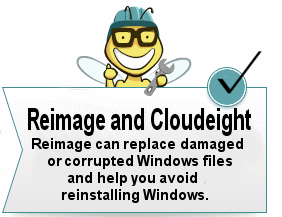
WHY THE GRASS IS NEVER GREENER AND HOW TO BE HAPPY TODAY Our Information Avenue Web Site The best of our tips and tricks, freeware picks and more are now online! You can leave your comments, make suggestions, and give us your feedback on our new interactive Information Avenue Web site. As of today there are 297 freeware picks, 787 computer tips and tricks, and a lot more information on our new Information Avenue web site. And we add more tips, tricks, freeware picks, featured articles and more - every day! You'll find our new site-search feature helps you find the information you want - instantly! Give it a try. We think you'll find our new InfoAve site a great place to go if you're looking for past freeware picks, tips and tricks or other computer information. Just type what you're looking for in the site search and if we've got it, you'll find it. It's easy and it's very fast. Please come visit our Information Avenue Web site. We're sure you'll find something you can use every time you visit. We update that page every day. And you can leave your comments after any article. SPECIAL NEW LOW PRICE FOR CLOUDEIGHT SUBSCRIBERS ONLY! Until now, if you're computer had corrupted or damaged Windows system files, there was only one way to repair the damage: reinstall Windows. But that means if you don't have your files backed up (and you should, you know) - you're going to lose everything, not to mention all the personalization and settings changes you've made. It's a hassle to reinstall Windows; it means hours or days - or even weeks - trying to get your computer back to the way you want it. Try Reimage right now! But now you don't have to resort to reinstalling Windows - you can choose to use Reimage. Reimage keeps an huge inventory of Windows system files to replace or repair any missing or corrupted files on your Windows XP, Windows Vista or Windows 7 computer. And with a money-back guarantee, you've got nothing to lose but the aggravation of installing Windows. If your computer is at the point where you're seriously consider reinstalling Windows - stop. Try Reimage first. We think you'll be glad your did! Get more information and or try Reimage right now. Reimage can replace and repair critical Windows system files and save you from the hassle of reinstalling Windows. Try Reimage right now! Thanks again for subscribing to Information Avenue Free Edition. Have a nice weekend. Best wishes, Eightball & Thundercloud Questions? Comments? Suggestions? We're always glad to hear from you!  Cloudeight Direct Computer Care: Get more information about our Cloudeight Direct Computer Care service here. If you need to change your subscription address or wish to unsubscribe from this newsletter :( click "Manage my subscription" at the very bottom of this newsletter. Share this newsletter with your friends! Forward this newsletter or send a link to this newsletter online at http://thundercloud.net/infoave/archives2012/week-531.htm . We'd appreciate it and maybe your friends would too! . PLEASE CLICK HERE TO READ THIS IMPORTANT DISCLAIMER This newsletter is published weekly by: |



| All content is copyright ©2012 by Cloudeight Internet, LLC. |

| You are currently subscribed to informationavenue as: ovejatri.blog.daily@blogger.com Add informationavenue@pr1.netatlantic.comt to your email address book to ensure delivery Forward to a Friend | Manage Subscription | Subscribe | Unsubscribe |  |
0 comments:
Post a Comment