


OS X Daily: “Stop iPad Picture Frame from Zooming in on Faces” plus 1 more |  |

| Stop iPad Picture Frame from Zooming in on Faces Posted: 10 Apr 2012 09:54 AM PDT
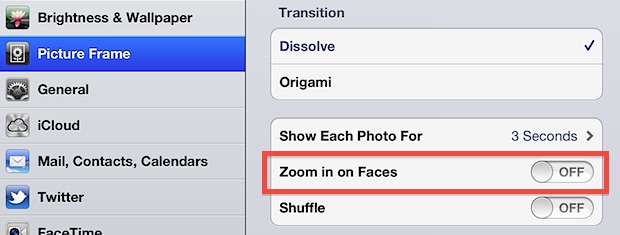
The iPad picture frame app is a nice way to put a stale iPad to use as it sits on a desk. That resulting live picture frame is made even better when a custom album is created for the purpose, but if you use photos of people you’ll find that Picture Frame automatically zooms in their faces. Great if the album is intended to showcase people, not so great if you’re trying to show the wider scene. Here’s how to turn off that face zoom feature:
Exit out of settings and go back to the lock screen to enter back into Picture Frame, which you’ll find no longer zooms on faces.
|
| The Best Free Text Editor for Mac OS X Just Got Better: TextWrangler 4 Posted: 10 Apr 2012 08:58 AM PDT
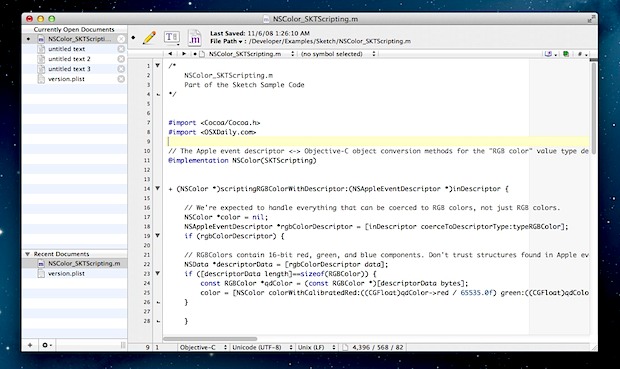
TextWrangler is a very powerful general purpose text editor with a heavy emphasis on development and programming. We’ve long been big fans of TextWrangler around here as it is unequivocally the best free text editor out there for Mac OS X, and now that title is cemented even further with the release of TextWrangler 4.0. The first thing you’ll notice with TextWrangler 4 is the redesigned UI, which ditches the right-side drawer and brings the documents window to the left a la iTunes and BBEdit. Of course there are feature improvements too, including new find and multi-file search capabilities, the ability to search through compressed files, a much improved built-in S/FTP browser, better syntax highlighting and color scheme support, OS X Lion+ full screen support, improved preferences, a beautified retina icon, and much more. All in all an excellent update to an already excellent application. If you’re looking for a high quality free text editor for Mac, TextWrangler is it, it’s fast, lightweight, powerful, and freakishly good for a free app, though don’t be shy to shell out for it’s bigger brother BBEdit, which is even more powerful and includes hoards of web and development tools. You’ll need Mac OS X 10.6 or later to run TextWrangler 4, though the Full Screen support obviously requires OS X 10.7 or 10.8. Random TextWrangler tip: If you’d rather use a third party S/FTP client like CyberDuck or Transmit, set TextWrangler as the default associated text editor for the filetypes in OS X. Now you can use TextWrangler to open remote items, and anytime you save a file through TextWrangler it will automatically upload the new revision to the remove server via your preferred SFTP client.
|
| You are subscribed to email updates from OS X Daily To stop receiving these emails, you may unsubscribe now. | Email delivery powered by Google |
| Google Inc., 20 West Kinzie, Chicago IL USA 60610 | |
0 comments:
Post a Comment