


OS X Daily: “Safari 5.1.4 Brings Performance Improvements and Bug Fixes” plus 2 more |  |

- Safari 5.1.4 Brings Performance Improvements and Bug Fixes
- Download SoundCloud Songs as MP3 with a Bookmarklet
- Convert Text to Emoji Automatically in Mac OS X
| Safari 5.1.4 Brings Performance Improvements and Bug Fixes Posted: 12 Mar 2012 10:20 AM PDT
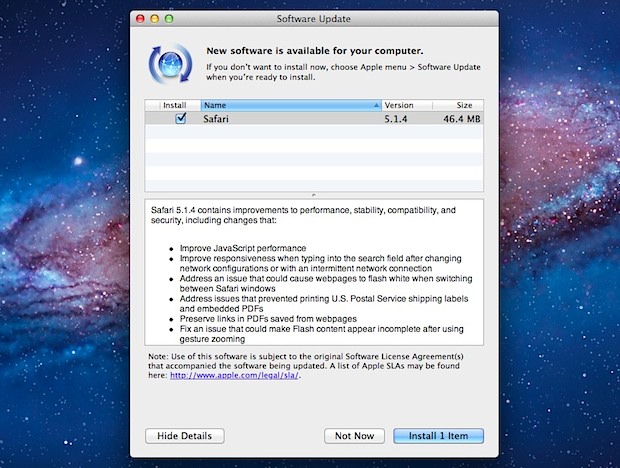
Apple has updated Safari to version 5.1.4, and although the version number signifies a minor release the update includes several notable performance enhancements and bug fixes. From the average end-users perspective, an 11% boost in Javascript performance and improved handling of Safari extensions will be most noticeable, though the update includes many more changes and bug fixes which are listed below. Safari 5.1.4 is available for Mac OS X 10.7 and OS X 10.6.8, and is a recommended update to all Safari users. Users can download the latest version via Software Update from the Apple menu or from Apple directly. The official change list is as follows:
If you use Safari as your default web browser, don’t miss it.
|
| Download SoundCloud Songs as MP3 with a Bookmarklet Posted: 12 Mar 2012 10:02 AM PDT
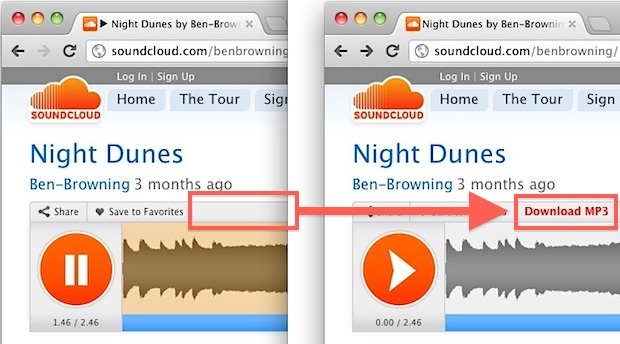
SoundCloud is a popular online music and audio sharing service where a lot of bands and musicians will post their music for others to listen to. Frequently they’ll include a download link to songs, but depending on the posters account, they often have download limits that can be quickly maxed out on popular songs. The easiest solution of course is to just buy the song, but that’s not always an option either, so that’s where this bookmarklet comes into play. You can either just copy and paste the string below into the browsers URL bar while on a SoundCloud page, or save it as a bookmarklet that can be clicked on any SoundCloud page to activate the “Download MP3″ button. Save the code above as a bookmarklet, or you can grab a Safari Extension. Just don’t expect stellar audio quality, because the songs are downloaded as 128kbps MP3s. That’s not a big deal if you planned on compressing the audio to save space on an iPod or iPhone anyway, but if you’re listening to the music on a high quality stereo you may notice the faint hiss and flatter sound of compressed audio. Heads up to HackerNews for the find.
|
| Convert Text to Emoji Automatically in Mac OS X Posted: 12 Mar 2012 05:04 AM PDT
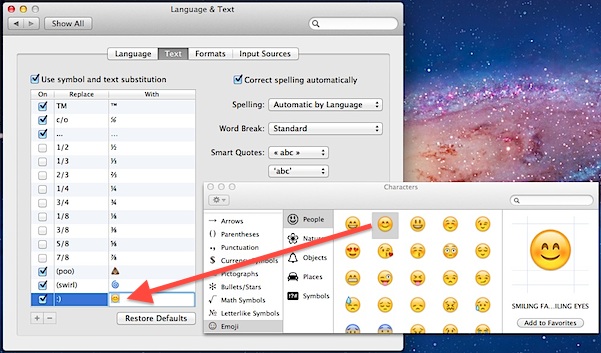
Now that the Mac has native Emoji support, you can set up text substitutions to automatically convert specific text to emoji when typing shorthand, abbreviations, or emoticons. Here’s how to configure the text-to-emoji conversions:
To verify the text substitutions are working as intended, open TextEdit and type the shorthand for the emoji you specified, after you hit the space bar it should convert from text to emoji immediately. In the screenshot example, the classic colon parenthesis smiley face will be replaced with an emoji smiling face, the text (poo) will become the happy poo emoji, and the text (swirl) becomes the swirl emoji. These Emoji conversions will occur everywhere, including the Finder and in folder and file names The only technical limitation is the eventual number limit of emoji icons themselves, and remember that if you are using these substitutions in emails, iMessages, or other communications, the recipient must have OS X Lion or later or iOS 4 or later to see them.
|

| You are subscribed to email updates from OS X Daily To stop receiving these emails, you may unsubscribe now. | Email delivery powered by Google |
| Google Inc., 20 West Kinzie, Chicago IL USA 60610 | |
0 comments:
Post a Comment