Click " Skip Ads " to view this page

Saferich.biz
Cloudeight Information Avenue

Cloudeight InfoAve Free newsletter

Home | Cloudeight Home | Forum | Premium Subscriptions |  InfoAve E-book | Donation Station

Cloudeight Information Avenue - Issue #530 - March 24, 2012 - Read this issue on the Web

Dear Friends,

Welcome to Issue #530 of InfoAve Free Edition! 

Thank you very much for subscribing to our free InfoAve Newsletter.

If you need to change your subscription or you wish to unsubscribe from our newsletter and break our hearts, click "Manage my subscription" at the very bottom of this newsletter.

Thank you for very much for your support.


Cloudeight Direct Computer Care

We can fix your computer!
We all know that sooner or later our computers are going to start having problems. We can help you with any computer need -- from diagnosing and fixing Windows problems - to setting up a wireless network for you - to safeguarding by creating an image-based backup (the only kind that really works when you really need it to work) - to cleaning up your computer and optimizing it -- and more. We can do almost anything you need done and we guarantee our work - you're either satisfied or we'll refund your money.

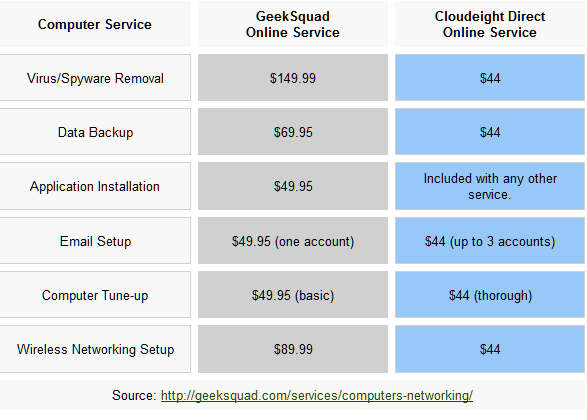
Compare our Prices and Experience!
We'd like to show you how our current prices compare to a leading computer repair service. And remember - Geek Squad "technicians" get two-weeks of training, but we've been helping people with their computers for over 12 years.

Cloudeight Internet

*Our computer tune up is a complete tune up - unlike the 10-minute tune-up Geek Squad offers for $49.99. Wish we could feel good about making $49.99 in ten minutes :-).

We offer many other computer services too! If you have a problem with your computer - we can fix it! .

Get more information and lock-in our current pricing by getting your Cloudeight Direct Computer Care service keys right now.

Our new Two-Session Key is on sale today! You can't beat our service -- or our prices -- anywhere.


A few of the many comments we received last week from our Cloudeight Computer Care Customers

A comment from David
What a great job you did on my computer! I can't believe how well it's running now since you did your magic. I would recommend you Cloudeight Direct Computer Care to anyone! What a great service. Thanks for helping fix my computer. David G.

Thanks so much David. We appreciate you using Cloudeight Direct. We're so glad we were able to help you. TC & EB


A comment from Wally
Aloha, Aaron worked long and hard to get my request to network wirelessly going. Great Job!!

Mahalo Nui Loa (Thank you Very Much)
Wally

Thanks for using Cloudeight Direct Computer Care. We're glad your experience as a positive one and that your wireless networking and wireless printers are set up correctly for you. It was a pleasure helping you with your computer. Thanks for your kind words and your support. TC & EB


A comment from JoAnn
I was so very happy & pleased to have T.C. fix my computer. He spent so much time & was so determined to be very thorough. It was not an easy task & we did have a couple of snags. But T.C. was always back w/me to continue his work. It all turned out great and he gave me the answers to all of my questions. Congratulations to Cloudeight on this new venture of Direct Computer Care, and it has already been a great help to me. Many, many thanks to T.C. & his knowledge. JoAnn

Thanks so much JoAnn. We're glad that we were able to help you with your computer troubles!  Thanks for your nice comments and for using Cloudeight Direct Computer Care. TC & EB


QUESTIONS AND ANSWERS
Dave can't remember his wireless security key
I can't remember what my security key for my wireless network is and want to use it on my new iPad. How do I find out what this key is? Thanks!

Our Answer
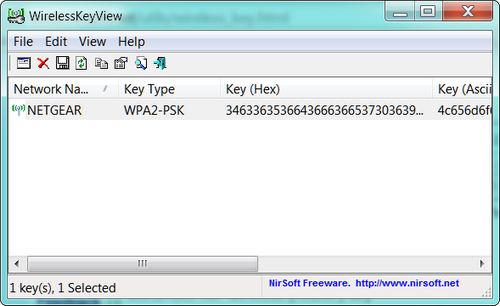
Here is an easy way to recover your wireless router security key, and it works well most of the time. It's called "Wireless Key View" by Nirsoft. It's a very small download – zip file – that you simple extract to a folder and click on the exe file to use it. In the main view you'll see the key in both HEX and Ascii. You'll be most interested in Ascii – that's your wireless key. You can download WirelessKeyView from http://www.nirsoft.net/utils/wireless_key.html  .
Cloudeight InfoAve

Note there are two versions – one for 32bit computers and one for 64bit. And don't forget to read the program's documentation. We hope this helps you. This program sets off alarm bells in many security programs because of the type of program it is. The program is 100% free from viruses, spyware and malware. You can ignore your security program's warnings if this program upsets your security program :-) .

Jane asks us about a program called "Recuva"
What do you about a program called "Recuva"? It's suppose to help recover files which have been deleted. This could be very useful to me since I recently deleted an entire folder of photos that I can't replace. What's the catch? Can you really recover files which have been deleted?

Our Answer
Hi Jane. We're familiar with Recuva. In fact a couple of years ago it was one of our freeware picks. It's a good program and it works, but it's important to know its limitations.

Here is how Recuva works: If you've deleted something and emptied your recycle bin the files you've deleted are not really gone. Most of them may be completely recoverable, if they have not been overwritten with other data. But, in order to retrieve deleted files which have been removed from your Recycle Bin, you need the right tools. That's where a program like "Recuva" comes in handy. Recuva will scan your drives for files you've deleted and recover them - if they're recoverable (i.e. they've not been overwritten with other data).

Keep this in mind: The more time that passes between the time you deleted the files and the time you attempt to recover them, the more unlikely it is you'll be able to recover a deleted file. So it's really essential if you deleted something really important that you don't wait too long to attempt to recover it. A good rule to remember is to attempt to recover the files you've deleted by accident as soon as you realize what you've done.

Let's say you took pictures of a birthday bash last Friday. And, tomorrow, you want show these pictures to some friends who were acting crazy at the party. But now you can't find all those wonderful pictures. You panic. Someone deleted all of those wonderful birthday shots and emptied the recycle bin. Now you have to find those pictures somewhere. What you need is Recuva. Recuva will scan your hard drives and find all the files you've deleted that can be recovered (and even show you the ones you cannot recover unless you spend about a zillion dollars on professional recovery software).

"Recuva (pronounced "recover") is a freeware Windows utility to restore files that have been accidentally deleted from your computer. This includes files emptied from the Recycle bin as well as images and other files that have been deleted by user error from digital camera memory cards or MP3 players. It will even bring back files that have been deleted by bugs, crashes and viruses!"

That's what Recuva is and what it does. It's not a program you'll use every day or even every week. It's one of those tools that you need to have in your toolbox at all times. Recuva is one of those tools that it's better to have and not need than to need it and not have it.

Recuva is simple enough so even the newest computer user can figure it out. It is freeware.

If you're interested you can read more about and/or download Recuva here.

InfoAve Premium contains over three times as much content as our free edition - help yourself and help us too...

Upgrade to InfoAve Premium right now - LIFETIME SUBSCRIPTIONS are now ON SALE!


Special Offers On Computer Related Products

SuperAntiSpyware Professional with a lifetime license - $24.95 - best price anywhere!

Registry Commander - Take command of the Windows registry and save $10.00 off the retail price!

Captain Optimizer -- Be the captain of your computer - tweak, control, configure, clean and more! Save $10.00 off the retail price!

HubbaDogs! We have 'em. Cute dog-shape 4-port USB hubs. Get yours while we still have them!


COMPUTER TIPS AND TRICKS

What to do when Adobe Flash becomes unresponsive in Google Chrome
Windows XP, Vista, Windows 7, Windows 8
Google Chrome browser installed

I use Google Chrome as my default browser. Several times I've had Adobe Flash crash right in the middle of doing something important. It seems that Flash becoming unresponsive in Chrome is quite common. And it happens for a reason.

Chrome comes with an integrated version of Flash installed. If you also have Firefox installed and you install Flash for Firefox, it also installs as a plugin in Chrome - and this can cause conflicts and problems when you view a page using Flash.

So here's how to fix it.

Open Chrome

Type about:plugins into the address bar at the top and press the ENTER key to display Chrome's Plugins page

Look down the list of Plugins for 'Flash' – if it says 'Flash (2 files)' you do have both versions of Flash installed which may cause Chrome to crash when accessing Flash-based websites

Click on the '+ Details' link at the top right of the Plugins page to expand the list of all Plugins

Scroll down the list to find the Flash plugin – you should now see the full details of the Flash plugin displaying two versions of Flash.

Look at the 'Location:' of each version – one is the integrated Chrome version (…Application Data\Google\Chrome etc) and the other is the standalone Adobe (formerly Macromedia) version which is in the …Windows\system32\Macromed\Flash etc directory.

Click on 'Disable' just under the Location of the Chrome version to disable it (and it will become grayed out)

Ensure that the standalone Adobe version is enabled – if it is disabled (grayed out) click the 'Enable' link just under its Location to enable it and then close the Plugins tab

Download  the latest Adobe standalone version of Flash from here  (this is the Firefox/Chrome version) and save to your computer. Close Chrome and then install the newest standalone version of Flash you just downloaded.

Now restart Chrome and go to the Adobe Flash Player test page at http://www.adobe.com/software/flash/about/  to make sure Flash is installed and working correctly.

Since you have disabled the integrated version of Chrome,  you will need make sure the standalone Adobe version is updated regularly. This is important because outdated versions of Flash leave you open to vulnerabilities. To enable automatic updates for Flash, go to Control Panel\Flash Player and open the Flash Player Settings Manager. Now click on the Advanced tab and in the Updates section select "Check for updates automatically (Recommended)."


Are You Getting the Broadband Speeds You're Paying For?
Windows XP, Vista, Windows 7, Windows 8

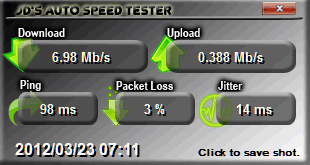
I don't know exactly what speed I'm supposed to get. I'm using RoadRunner Turbo. But when I first connected to the Internet back in 1995 -- way back then - all we had was dialup. I can remember downloading freeware and panicking if the size of the file was larger than say, one megabyte. I used to figure it would take me 6 minutes to download one megabyte. So if there was file that was 5MB -- I figured 30 minutes. I could go eat lunch in 30 minutes and come back and the file would be downloaded -- if I was lucky. I had to keep your fingers crossed that my Internet connection wouldn't burp during that 30 minutes and stop the download. If it did, I had to start all over. And it often burped. Anyway -- I just looked it up and I'm supposed to be paying for 10mbps and I'm getting around 7mbps. I wonder if they will give me a 30% discount for the 30% lower-than-advertised speed. Haha. Right! Whatever speed I'm getting -- I'm happy. I can download a 5MB file in a second or two which is a lot better than 30 minutes - although I don't have time for lunch now -- well I mean during the download.

And a lot of things affect your Internet connection speed. If you're on a wireless connection like I am right now - the distance from the router can cause a degradation in speed. Sometimes a server on the Internet will be slower because of Internet traffic. A lot of things affect the speed of your connection - as I'm sure my ISP would gladly point out.

It's always fun to see how fast or slow you connection is. And we've found a really nice program that lets you check your Internet connection speed in the background while you work or play. And it keeps track of the fluctuations in your connection speed and saves them to a file so you can confront your ISP if you think you're not getting the speed you're paying for. Or you can use the log to test your Internet tweaking, or your new router, or your new cable modem, or your new network card, or your new wireless configuration. Or you can just use it to check your connection speeds over the course of time.

Is this a program you really need? Nah! Is it a program that is useful? Yes, I think so. Is it fun? Very much so.

Cloudeight InfoAve

Here's what the developer has to say:

Does your Internet services provider supply you with the service speeds that were advertised? Does it do this 24 hours a day 7 days a week?

With this free program you can do regular internet speed tests in the background. It logs all your data and enables you to see at a glance what your speeds are doing over the course of the hour/day/week/month etc. It will test your download & upload speeds your ping times, packet loss and jitter.
It will generate a CSV log file for all this data and also present you with a graphical representation. you can also create screen shots of the graph & the manual results window. The memory usage i have managed to get down to approx < 2MB whilst in "sleep" mode (in tray) so a very small footprint.

Test download speed from a list of supplied default servers
Test Upload speed to a donated testing server
Test Ping, Pkloss & Jitter to/from any applicable URL
Add any user chosen test file URL's
Test download speed from multiple servers with each test
Test download & upload speeds from/to personal servers
Test all, some or just one attribute (DL, UL, Ping, Pkloss, Jitter)
Load results log into any program that supports .CSV
Send automated emails when thresholds are reached

It's called JDAUTO Speed Tester and it's good clean freeware -- no bundles or other garbage in the installer. It's a 3.63MB download and it's available from the author's site right here.


A Handy Reference Guide to Windows 7 Keyboard Shortcuts
Windows 7

One of the most requested tips is for keyboard shortcuts. Keyboard shortcuts are handy time savers, but unless we use them frequently, we forget them. So here are some of our favorite keyboard shortcut for Windows 7. These are the shortcuts we use most often. Those of you using Windows XP, Windows Vista, or even Windows 8 Consumer Preview will find that many of these shortcuts will work in your version of Windows also.

Windows Key+F — Search for File or Folder
Windows Key+F1 — Help
Windows Key+Shift+Left-Click Taskbar Icon — Open New Instance of Application
Ctrl+Shift+Left-Click Taskbar Icon — Open Program as Administrator
Windows Key+P — Designate What Second Monitor Should Display
Windows Key+Plus or Minus — Zoom In or Out of Desktop
Ctrl+Shift+Esc — Task Manager
Windows Key+L — Locks Computer
Ctrl+Click Taskbar Icon — Cycle Between Windows of an Application
Alt+Tab — Switch Between Windows
Ctrl+Alt+Tab — Switch Between Windows Using Arrow Keys
Windows Key+Tab — Switch Between Windows Using Aero
Ctrl+Windows Key+Tab — Switch Between Windows Using Aero with Arrow Keys
Windows Key+Down — Minimize the Open Window
Windows Key+Up — Maximize the Open Window
Windows Key+Left — Snap to the Left Side of the Screen
Windows Key+Right — Snap to the Right Side of the Screen
Windows Key+Shift+Right — Move Window to Another Monitor
Windows Key+D — Hide Windows / Show Only the Desktop
Ctrl+C — Copy
Ctrl+X — Cut
Ctrl+V — Paste
Ctrl+B — Bold
Ctrl+I — Italic
Ctrl+S — Save
Ctrl+U — Underline
Ctrl+Z — Undo
Ctrl+Y — Redo
Ctrl+A — Select All
Ctrl+P — Print
Ctrl+Right — Move Cursor to Beginning of Next Word
Ctrl+Left — Move Cursor to Beginning of Previous Word
Ctrl+Down — Move Cursor to Next Paragraph
Ctrl+Up — Move Cursor to Previous Paragraph
Shift+Delete — Delete Selected File Without Recycling


Captain Optimizer


THIS WEEK'S FREEWARE PICK

Freehand Painter
Freehand painting program
Works with Windows XP, Vista, Seven, Windows 8 (32bit/64bit)
Approx 3.2MB

I've always wished that I could paint. If I were an artist I'd paint nostalgic scenes and be a time traveler. I'd paint steam locomotives and old main street scenes of beautiful women with parasols and men in top hats and waistcoats. I'd paint bucolic scenes of autumn trees along dirt roads with horses and buggies transporting their passengers to places unknown. I'd paint scenes of children splashing in rain puddles and laughing in their innocence.

Alas I cannot paint and I'm not an artist; I envy those who are. How amazing it must be to take the images in the mind and put them down on canvas.

Maybe you're an artist or maybe you have some artistic talent to unleash. Or maybe you're like me and you can barely paint a stick figure. Regardless of you artistic ability, I think you'll find this freeware pick a fun program at the least, and perhaps a program that will help release the artist inside. You never know.

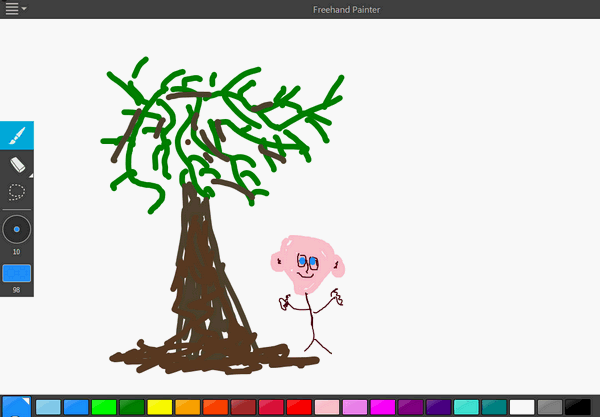
This Cloudeight Freeware Pick is called "Freehand Painter". It's about as simple to use as these kinds of programs get. Just download and install it and you'll immediately get the hang of it. Look below to see the wonderful painting I made in just a few minutes! For $1500.00 I'll send you a signed original :-)
 

Cloudeight InfoAve

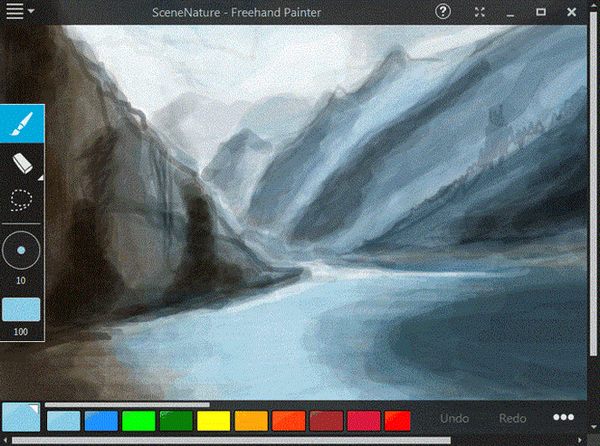
The picture above is my handiwork - I told you I wasn't an artist! But if you are an artist or have a lot more talent than I do, you could paint something like this with Freehand Painter:

Cloudeight InfoAve

The author will put his two-cents worth in now, if you don't mind:

"Put your paints, brushes and canvas aside! Freehand Painter helps you create vector-based impressive paintings with brilliant effects on your PC. You can try out different artistic styles in this easy to use application. Just doodle on your touch screen PC to create realistic paintings with your fingers. You can achieve the expressiveness of natural media with vector graphics. Its simple user interface keeps everything at your fingertips. It is ideal for anyone who wants to paint or draw on their touch screen computer.

Design attractive logos, or create eye-catching web graphics with the simple and adjustable brush tool. Adjust the size of brush tool, with the sliding scale to create colorful lines of various thickness. Use a preset color palette or make your own unique color ranges, to give your painting a professional look and feel.

Make your artwork perfect by using Freehand Painter's editing tools. Use the lasso selection to select a shape, just by dragging a marquee around it. Instead of erasing your painting pixel-by-pixel, use the stroke eraser. It erases the entire stroke that you have drawn. You can compose a painting with several independent layers using the layer functionality..."

So there you go my fellow artists - grab Freehand Painter and create something beautiful and have fun doing it too! You can read more about Freehand Painter and/or download it from the Freehand Painter site. It's freeware and  contains no bundled software. Have fun!

Do you have a freeware program you love? Tell us about it!


This week's essay

The Bigger My World Gets

In the midst of a busy and tiring day like this one, it's hard to imagine tranquility. It's hard to separate myself from all that swirls around me and imagine a simpler day, a simpler time, a simpler place. Someday these kinds of busy days will be far behind me and I'll have only the vaguest memories of them. And when that someday comes, I'll yearn for the time when my days were full and busy and the swirling retinue of having so many things to do would be a welcome and much appreciated reprise. There's a constant yearning within me - for what I used to be, for what I might have been, for what I still might be. My world has grown so big and complex and it hard sometimes not to yearn for the small and uncomplicated world I knew as a child.

When I was a child my world was small and uncomplicated; my dreams were unfettered by the restrictions of what is possible, untainted by reality: the dreams of a child are pure. When I was a child I had dreams of becoming a professional baseball player, a TV weatherman, a rock star, a movie star, a writer, a fireman who race to fires in a white fire truck, a lone sailor sailing a vast but placid sea, discovering uncharted islands, an astronaut landing on a distant planet, and so many other things.

The bigger my world gets, the smaller my dreams become.

Read the rest of this essay here.


Our Information Avenue Web Site

The best of our tips and tricks, freeware picks and more are now online! You can leave your comments, make suggestions, and give us your feedback on our new interactive Information Avenue Web site. As of today there are 294 freeware picks, 776 computer tips and tricks, and a lot more information on our new Information Avenue web site. And we add more tips, tricks, freeware picks, featured articles and more - every day! You'll find our new site-search feature helps you find the information you want - instantly! Give it a try. We think you'll find our new InfoAve site a great place to go if you're looking for past freeware picks, tips and tricks or other computer information. Just type what you're looking for in the site search and if we've got it, you'll find it. It's easy and it's very fast. Please come visit our Information Avenue Web site. We're sure you'll find something you can use every time you visit. We update that page every day. And you can leave your comments after any article.

And you can get new tips, tricks, freeware picks, and more each day via email - subscribe to our FREE InfoAve Daily newsletter. It's free and it's sent every evening around 7:00 P.M. Eastern time (USA).


Reimage and Cloudeight
Wait! Don't reinstall Windows! Read this first!

Until now, if you're computer had corrupted or damaged Windows system files, there was only one way to repair the damage: reinstall Windows. But that means if you don't have your files backed up (and you should, you know) - you're going to lose everything, not to mention all the personalization and settings changes you've made. It's a hassle to reinstall Windows; it means hours or days - or even weeks - trying to get your computer back to the way you want it. Try Reimage right now!

But now you don't have to resort to reinstalling Windows - you can choose to use Reimage. Reimage keeps an huge inventory of Windows system files to replace or repair any missing or corrupted files on your Windows XP, Windows Vista or Windows 7 computer. And with a money-back guarantee, you've got nothing to lose but the aggravation of installing Windows. If your computer is at the point where you're seriously consider reinstalling Windows - stop. Try Reimage first. We think you'll be glad your did! Get more information and or try Reimage right now.

Reimage can replace and repair critical Windows system files and save you from the hassle of reinstalling Windows.

Try Reimage right now!


Cloudeight InfoAve Donation Station

Visit Our Donation Station


Thanks again for subscribing to Information Avenue Free Edition.

Have a nice weekend.

Best wishes,

Eightball & Thundercloud
Cloudeight Information Avenue Free Edition - Issue #530
March 24, 2012

Questions? Comments? Suggestions? We're always glad to hear from you!

Cloudeight Direct

Cloudeight Direct Computer Care:
We make fixing your computer fun -- while we get the job done!
Your satisfaction is guaranteed or we'll give you your money back.

Get more information about our Cloudeight Direct Computer Care service here.

If you need to change your subscription address or wish to unsubscribe from this newsletter :( click "Manage my subscription" at the very bottom of this newsletter.


Share this newsletter with your friends! Forward this newsletter or send a link to this newsletter online at http://thundercloud.net/infoave/archives2012/week-530.htm . We'd appreciate it and maybe your friends would too! .

PLEASE CLICK HERE TO READ THIS IMPORTANT DISCLAIMER


This newsletter is published weekly by:

Cloudeight Internet LLC
PO BOX 73
Middleville, Michigan USA 49333-0073

All content is copyright ©2012 by Cloudeight Internet, LLC.


You are currently subscribed to informationavenue as: ovejatri.blog.daily@blogger.com
Add informationavenue@pr1.netatlantic.com to your email address book to ensure delivery
Forward to a Friend  |  Manage Subscription  |   Subscribe  |   Unsubscribe
Net Atlantic

0 comments:

Post a Comment

top